English · 简体中文 · Quickstart · Why Zamak · The Book · Language tour · VS Code · Zed · Packages





Open source · Native code · Ownership without garbage collection
Written with clarity. Compiled with precision.
Zamak is a statically typed language for people and AI agents alike. Its syntax stays light and familiar. Its compiler produces standalone native executables. Ownership manages memory without a garbage collector, and every error comes with a stable code and a fix you can act on.
Created by rayL-K · VeyraLux
Community · QQ group 1132190721 · Discord (invite renews about every 30 days)
Quickstart
Install the compiler, then create and run a project:
npm install -g @veyralux/zamak    # Or: npx @veyralux/zamak --version to try it first
zam new hello                     # Creates hello/zam.toml and hello/src/main.zm
zam run hello                     # Prints "hello from zamak"
zam needs a C compiler for build and run (zam check does not). On Windows that is Visual Studio Build Tools with the Desktop development with C++ workload, found through vswhere, falling back to gcc or clang on PATH; on Linux install build-essential; on macOS run xcode-select --install. Set CC to choose a compiler yourself.
Other ways to install, and the full command set:
Use Zamak with your AI agent
zam new myapp --template aiThat creates .claude/skills/zamak/SKILL.md, AGENTS.md, and .mcp.json alongside the project, each carrying a one-page language reference and the check-fix loop. The text is built into zam, so it always matches your version. Your agent reads diagnostics from zam check --json, and through zam mcp it can call check, build, run, test, format, explain, and docs directly.
Install Zamak
To build from source instead of using npm, you need Rust stable and a C compiler. In the repository root:
cargo install --path zam --lockedZamak finds a C compiler on each platform as follows:
| Platform | C compiler |
|---|---|
| Windows x64 | Visual Studio Build Tools with the Desktop development with C++ workload, located through vswhere. If it isn't installed, Zamak uses gcc (for example, MinGW-w64) or clang from PATH. |
| Linux | cc, clang, or gcc from PATH. On Debian and Ubuntu, install build-essential. |
| macOS | Xcode Command Line Tools. To install them, run xcode-select --install. |
To choose a GCC-style compiler yourself, set CC. zam check doesn't need a C compiler. CI runs the full test suite on all three platforms.
Create your first project
zam new hello           # creates hello/zam.toml and hello/src/main.zm
zam run hello           # prints: hello from zamak
zam check hello         # type and borrow check only, no C compiler needed
zam fmt hello           # normalizes indentation
zam test hello          # runs every fn test_...() in the project
zam build hello         # writes build/hello-<hash>(.exe)
zam run app.zm -- a b   # pass arguments to the program
zam doc hello           # writes an HTML API page from the pub declarations
zam writes build progress to standard error, so standard output holds only your program's output.
Why Zamak
Reads like Python. Runs like C. Safe without a garbage collector.
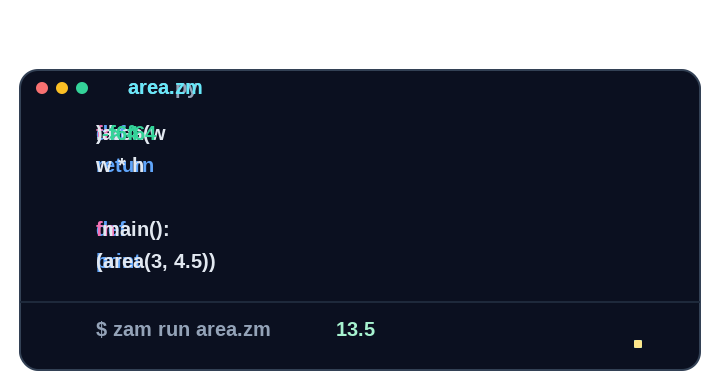
| As fast as C | 17 KB hello world on Linux | 20 MB where Java uses 365 MB | No lifetime annotations | Overflow checked in release builds |
|---|
Zamak is built for a way of working where several AI agents edit one project in parallel and build thousands of times a day. When goals conflict it prioritizes build cost, then memory safety, then runtime performance, then expressiveness, which is why there are no macros, no dependent types, and no lifetime annotations.
- Why this language exists, and what it borrows from Rust, Go, C, and Python
- How it compares with popular languages, and when to choose something else
Example
This program counts how often each word appears in its input:
use std/io

fn main() -> !string:
    let text = io.read_all()?
    let mut counts: {string: i64} = {}

    for word in text.words():
        counts[word] = counts.get(word, 0) + 1

    for word, n in counts:
        print(f"{word}: {n}")
$ echo "to be or not to be" | zam run count.zm
to: 2
be: 2
or: 1
not: 1Note
Zamak 0.2.1 is an early release. Use it to learn, experiment, and write command-line tools. Syntax and cache formats might still change before 1.0, so wait before you use it in production.
Features
- Familiar syntax.
len(xs),for i in range(n),xs[-1],xs[1:3],f"...", and Python's division rules.7 / 2is3.5,7 // 2is3, andlen("你好")is 2. - Ownership without a garbage collector. Values move on assignment; a read-only parameter borrows automatically;
&mut xmarks a call that changes its argument. A borrow lasts one call, so you never write lifetime annotations. - Checked where it matters. Integer overflow, division by zero, and out-of-bounds access stop the program in every build, and the compiler removes the checks it can prove redundant.
- Fast feedback.
zam checkneeds no C compiler and finishes in under 0.1 s on a 5,000-line project; a one-line edit rebuilds in about 0.75 s. - Native, standalone output. Zamak generates C and compiles it with MSVC, GCC, or Clang. The executable needs neither Zamak nor Rust.
- Batteries included. HTTP and HTTPS clients and a multithreaded server, threads and queues, SQLite, JSON for any type, regular expressions, dates, big integers, and command-line options read into a struct. They're built into
zam, so there's nothing else to install. - Desktop windows. Native controls on Windows, macOS, and Linux, plus a canvas and a set of ready-made controls you can restyle or draw yourself. On Windows,
zam build --noconsole --icon app.icomakes a program with no console window and your own icon.
See Grammar at a glance for the syntax and B. Performance for build and run numbers.
How Zamak compares
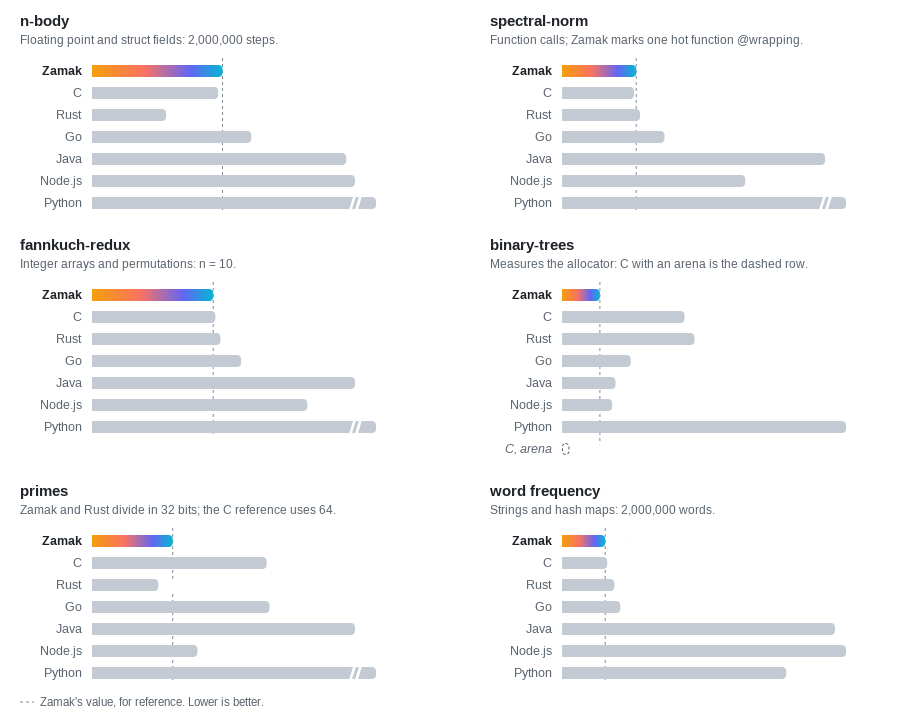
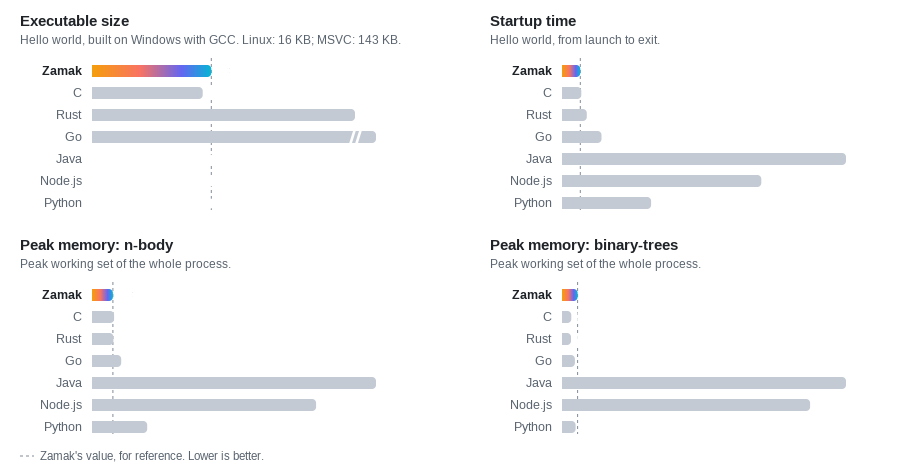
The same six programs, run in seven languages on one machine:
| Zamak | C | Rust | Go | Python | |
|---|---|---|---|---|---|
| Memory safe by default | ✓ | ✗ | ✓ | ✓ | ✓ |
| No garbage collector | ✓ | ✓ | ✓ | ✗ | ✗ |
| Integer overflow checked in release builds | ✓ | ✗ | ✗ | ✗ | not needed |
| Array bounds checked | ✓ | ✗ | ✓ | ✓ | ✓ |
| Standalone native executable | ✓ | ✓ | ✓ | ✓ | ✗ |
| No lifetime annotations | ✓ | ✓ | ✗ | ✓ | ✓ |
Zamak stays in C's range on the compute-bound programs while checking overflow and bounds by default: n-body, spectral-norm, fannkuch-redux, and word frequency all land within a few percent of C, sometimes ahead and sometimes behind, and the order moves between runs. On primes Zamak is about twice as fast as the C reference, and Rust is faster still: when both numbers fit in 32 bits, Zamak and Rust divide in 32 bits, while GCC compiles the C version's 64-bit % as a full 64-bit division. On binary-trees it is about 3 times faster than the C reference, but that gap comes from how the two programs are written rather than from the compiler: the C version allocates one node at a time while the Zamak version reuses small list buffers. A C build with an arena allocator does the same work in 63 ms against Zamak's 322 ms, so the row measures allocation strategy, not code generation. The flags are matched too: giving C the -funroll-loops Zamak's back end adds does not help it, and makes it slower on the other five programs. Earlier versions of this file said "3 times faster than C" without that caveat. For the method, both controls, the commands to reproduce them, and the scripts, see bench/compare.
Language tour
One program, using structs, error values, lists, borrows, and interpolation:
use std/string

struct Person:
    name: string
    age: i64

fn parse_age(text: &string) -> i64!string:
    let age = string.parse_i64(text)?
    if age < 0:
        fail "age must not be negative"
    age

fn main() -> !string:
    let mut names: [string] = []
    for i in 0..3:
        names.push("user{i}")

    let age = parse_age("42") catch e:
        println("bad input: {e}")
        return

    let p = Person(name: "Ada", age: age)
    for name in &names:
        println("{name} is {string.byte_len(name)} bytes")
    println("{p.name} is {p.age}")
Blocks are indentation, T!E is an error value, catch handles it in place, &names borrows for the loop, and {...} interpolates.
- Grammar at a glance has every construct, one section per topic with a runnable example.
- The Book goes deeper per chapter.
- examples/md2html is a four-module Markdown-to-HTML converter, about 270 lines:
zam run examples/md2html -- examples/md2html/sample.md.
Diagnostics
Every error carries a stable code, the location, and a suggested fix:
error[ZM301]: use after move: name
 --> moved.zm:8:5
  |
8 |     println(name)
  |     ^^^^^^^^^^^^^
  = help: borrow the value or move it only after the last use
zam check --json reports the same thing as one line of JSON, always in English, which is what an agent reads. On a system set to Chinese the text diagnostic is Chinese; set ZAMAK_LANG to en or zh to choose.
See diagnostic codes and the agent workflow.
Current limitations
No REPL or debugger yet. On Linux, window programs need GTK 3, and the canvas can't draw images yet. C functions take numbers, booleans, strings, bytes buffers, and C handles declared with extern type; pass other structs and callbacks through a small C wrapper. zam check reports a diagnostic for anything unsupported instead of compiling it.
Editor and agent support
- VS Code. The extension in editors/vscode adds syntax highlighting and runs
zam lsp, the Zamak language server, for diagnostics as you type, completion, hover, go to definition, and formatting. Other editors that support the Language Server Protocol can runzam lsptoo. - Zed. The extension in editors/zed adds a tree-sitter grammar for highlighting, outline, and folding, closes brackets and quotes as you type, indents after a line that ends with
:, and runszam lspfor the same language features. - AI coding agents.
zam mcpis an MCP server with tools to check, build, run, test, and format code, explain diagnostics, and look up docs.zam new --template aiadds a skill file,AGENTS.md, and.mcp.jsonto a new project, and .agents/skills/zamak/SKILL.md guides agents that work on the compiler itself.
Contribute
To report a bug or send a change, see CONTRIBUTING.md. The rules that every change follows, including the docs to update, are in AGENTS.md. Before you submit a change, make sure these commands pass in the zam folder:
cargo test --locked
cargo fmt --check
cargo clippy --all-targets --locked -- -D warnings
License
You can use Zamak under either the MIT license or the Apache License 2.0. Unless you state otherwise, you license your contributions under the same terms.
zam bundles Mbed TLS (Apache-2.0), libui-ng (MIT), and SQLite (public domain). If you distribute a program that uses HTTPS, TLS, or std/ui, include the notices in THIRD-PARTY-NOTICES.md with it.