Zacess themes
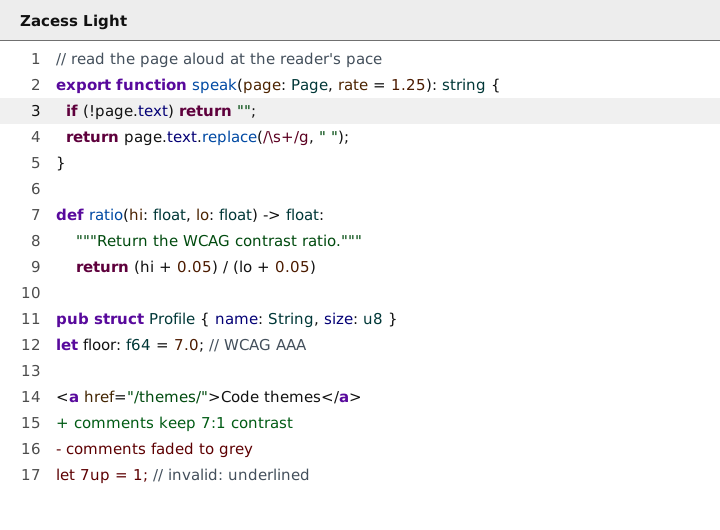
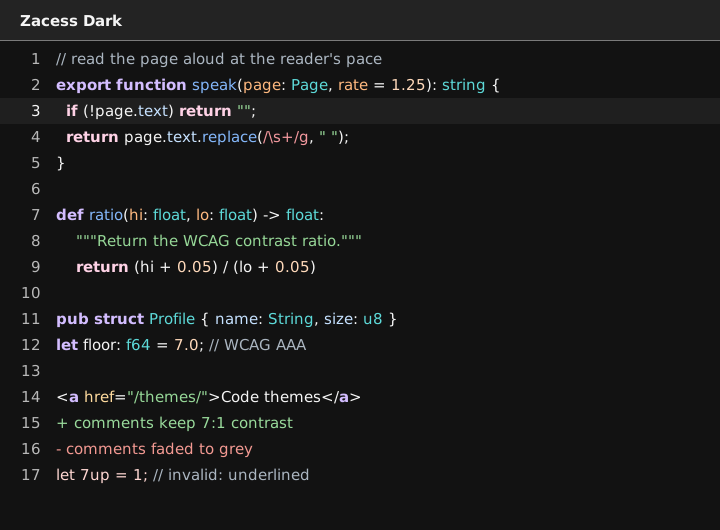
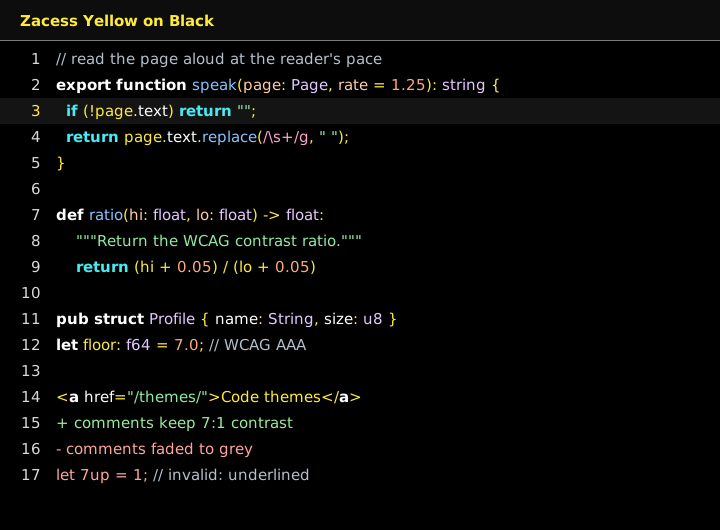
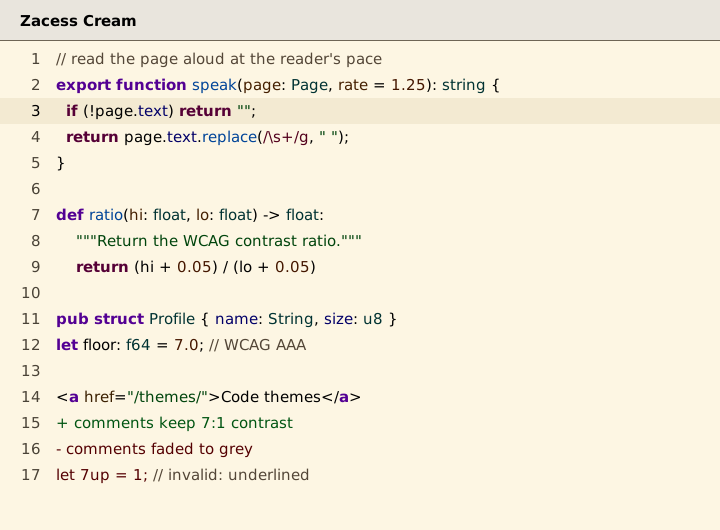
High contrast code themes that match the four contrast themes in the Zacess reader, so a student sees the same page in the reader and in the editor. One palette is the source of every colour. A small generator writes the files for each editor and the checks refuse any text or syntax colour below 7:1 contrast (WCAG AAA).
Built for VS Code, JetBrains IDEs, Obsidian, Neovim, Zed, Sublime Text, Helix, Emacs, iTerm2, Alacritty, kitty, Ghostty and Windows Terminal.
Note
Zacess Themes is on the VS Code Marketplace, Open VSX and the JetBrains Marketplace. Zed lists it in the Zed extension store. The Obsidian theme is in the Obsidian community directory and the Neovim schemes install from zacesshq/zacess.nvim. Every editor can also be installed from the latest release as described below.
The four themes
| Theme | Reader theme | For | Text on background |
|---|---|---|---|
| Zacess Light | Dark on light | Everyday use in a bright room | #111111 on #ffffff |
| Zacess Dark | Light on dark | Everyday use in a dim room | #f5f5f5 on #121212 |
| Zacess Yellow on Black | Yellow on black | Low vision | #ffeb3b on #000000 |
| Zacess Cream | Black on cream | Dyslexia friendly reading | #000000 on #fdf6e3 |
Colour is never the only signal
- Keywords, control flow and markup tags are bold.
- Comments and parameters are italic. Comments are never dimmed below 7:1.
- Invalid code is underlined.
- Tokens that often sit side by side, such as strings and numbers or added and removed lines, differ in lightness or font style and not only in hue. Each pair is checked under simulated protanopia, deuteranopia and tritanopia.
Contrast
Measured by scripts/check.mjs and written here by scripts/build.mjs, so the numbers are always
the ones CI enforced. Every ratio is rounded down.
| Theme | Text on background | Lowest syntax colour on background | Lowest syntax colour over the selection, current line or a diff |
|---|---|---|---|
| Zacess Light | #111111 on #ffffff, 18.8:1 |
8.3:1 (comment) | 7.2:1 (comment on diffRemovedBackground) |
| Zacess Dark | #f5f5f5 on #121212, 17.1:1 |
8.7:1 (removed) | 7.1:1 (removed on diffAddedBackground) |
| Zacess Yellow on Black | #ffeb3b on #000000, 17.1:1 |
11.0:1 (number) | 8.0:1 (number on selection) |
| Zacess Cream | #000000 on #fdf6e3, 19.4:1 |
8.4:1 (added) | 7.3:1 (added on selection) |
Every token in every theme, the interface colours, the terminal colours and the colour vision results are listed in ACCESSIBILITY.md.
Install
VS Code
Search for Zacess Themes in the Extensions view or install it from the VS Code Marketplace:
code --install-extension zacess.zacess-themesCursor, Windsurf, VSCodium, Antigravity, Kiro and other editors built on VS Code install it from
Open VSX. The .vsix in the
latest release works offline. Then run
Preferences: Color Theme (Cmd+K Cmd+T on macOS, Ctrl+K Ctrl+T elsewhere) and choose a
Zacess theme. Details are in editors/vscode.
JetBrains IDEs
In Settings, open Plugins, search the Marketplace tab for Zacess Themes and install it.
It is also on the JetBrains Marketplace page. Then choose a Zacess theme under
Appearance & Behavior, Appearance. It needs an IDE on the IntelliJ Platform 2025.3 or later.
For an offline install, download zacess-themes-<version>.zip from the latest release and choose
Install Plugin from Disk... from the gear icon in Plugins. Details are in editors/jetbrains.
Obsidian
Open Settings, then Appearance, select Manage under Themes, search for Zacess and
select Install and use. The listing is in the Obsidian community directory. To install
by hand, copy editors/obsidian/manifest.json and editors/obsidian/theme.css into
<vault>/.obsidian/themes/Zacess/ (the latest release also has them as
zacess-obsidian-<version>.zip). Light and Dark follow Obsidian's own
setting. Yellow on Black and Cream are offered through the Style Settings plugin. Details are in
editors/obsidian.
Neovim
zacess.nvim is listed in awesome-neovim.
Install zacesshq/zacess.nvim with any plugin manager. With
lazy.nvim:
{ "zacesshq/zacess.nvim", lazy = false, priority = 1000 }To install by hand instead:
mkdir -p ~/.config/nvim/colors
cp editors/neovim/colors/*.lua ~/.config/nvim/colors/
Then set vim.o.termguicolors = true and run vim.cmd.colorscheme("zacess-dark") in init.lua.
Details are in editors/neovim.
Zed
Run zed: extensions from the command palette, search for Zacess Themes and install it, then run theme selector: toggle and choose a Zacess theme. It is in the Zed extension store. Details are in editors/zed.
Sublime Text
Copy the four .sublime-color-scheme files from editors/sublime into Packages/User (open it with
Preferences, Browse Packages...), then run UI: Select Color Scheme and choose a Zacess
scheme. It needs Sublime Text 4. Details are in editors/sublime.
Helix
mkdir -p ~/.config/helix/themes
cp editors/helix/themes/*.toml ~/.config/helix/themes/
Then set theme = "zacess_dark" in ~/.config/helix/config.toml. Details are in
editors/helix.
Emacs
mkdir -p ~/.emacs.d/themes
cp editors/emacs/*-theme.el ~/.emacs.d/themes/
Then add (add-to-list 'custom-theme-load-path (expand-file-name "themes" user-emacs-directory)) and
(load-theme 'zacess-dark t) to your init file. Details are in editors/emacs.
Terminals
The four themes are in the iTerm2 Color Schemes collection as Zacess Light, Zacess Dark, Zacess Yellow on Black and Zacess Cream. Terminals that draw their theme lists from it, such as Ghostty and WezTerm, include them from their next update. The files here, for iTerm2, Alacritty, kitty, Ghostty and Windows Terminal, are in editors/terminals with the install step for each.
How it works
flowchart LR
    Palette["palette/zacess.json"] --> Build["scripts/build.mjs"]
    Palette --> Check["scripts/check.mjs"]
    Palette --> Preview["scripts/preview.mjs"]
    Build --> Editors["editors/: VS Code, JetBrains, Obsidian, Neovim, Zed, Sublime Text, Helix, Emacs, terminals"]
    Build --> Tables["Contrast tables in README.md and ACCESSIBILITY.md"]
    Preview --> Previews["previews/: SVG images and themes.json"]
Check --> CI["CI fails below a floor"]palette/zacess.jsonholds every colour: the interface, the syntax tokens and the 16 terminal colours of each theme, the font style of each token, the pairs of tokens that must look different and the floors the checks enforce.palette/schema.jsondescribes its shape.npm run buildwrites every editor's files from the palette. The generated files are committed, so each folder undereditors/stands alone.npm run checkvalidates the palette against its schema, measures every colour against the floors below and parses every generated file. It prints a table of every failure and exits non-zero.npm run previewdraws the SVG previews as real text in each theme's colours and writespreviews/themes.json, the data the themes page on the Zacess website is built from.npm run verifyruns the build and the previews again and fails if anything committed differs.
The checks need Node.js 24 and nothing else: the scripts have no dependencies.
| Rule | Floor |
|---|---|
| Every text and syntax colour on the background, the panels and bars, the selection, the current line and both diff backgrounds | 7:1 |
| The text colour over a find match | 7:1 |
| Every syntax colour over a find match, which also carries a border | 4.5:1 |
| Interface text: muted text, links, errors, warnings, information, line numbers and button text | 7:1 |
| Borders, dividers, focus outlines, indent guides and whitespace markers, on every surface they divide | 3:1 |
| Every terminal colour on the background | 7:1 |
| Every coloured terminal output against the terminal's default text: tone difference or OKLab distance in normal vision and under each simulation | 0.05 or 0.04 |
| Two paired tokens: tone difference (the cube root of relative luminance) | 0.05 |
| Two paired tokens under simulated protanopia, deuteranopia and tritanopia: OKLab distance | 0.04 |
The pair rules apply when two paired tokens share a font style. Pairs that are often red and green, such as strings and numbers or added and removed lines, must meet them whatever their style.
Layout
| Path | What lives there |
|---|---|
palette/ |
The palette and its schema |
scripts/ |
The generator, the checks, the previews and their shared colour maths |
editors/vscode/ |
The VS Code extension |
editors/jetbrains/ |
The JetBrains theme plugin and its Gradle build |
editors/obsidian/ |
The Obsidian theme |
editors/neovim/ |
The Neovim colour schemes |
editors/zed/ |
The Zed theme extension |
editors/sublime/ |
The Sublime Text colour schemes |
editors/helix/ |
The Helix themes |
editors/emacs/ |
The Emacs themes |
editors/terminals/ |
iTerm2, Alacritty, kitty, Ghostty and Windows Terminal themes |
previews/ |
The preview images and the data for the website |
assets/ |
The Zacess mark the icons are made from |
Contributing
Change colours in palette/zacess.json only, then run the build, the checks and the previews. The
full workflow is in CONTRIBUTING.md. A contrast or readability problem is a bug:
report it with the
readability form.
Licence
The themes are free to use under the MIT licence.