Truly Zen
A Zed editor theme for total concentration. Dark, minimal, and just a little bit mysterious.
What's the vibe?
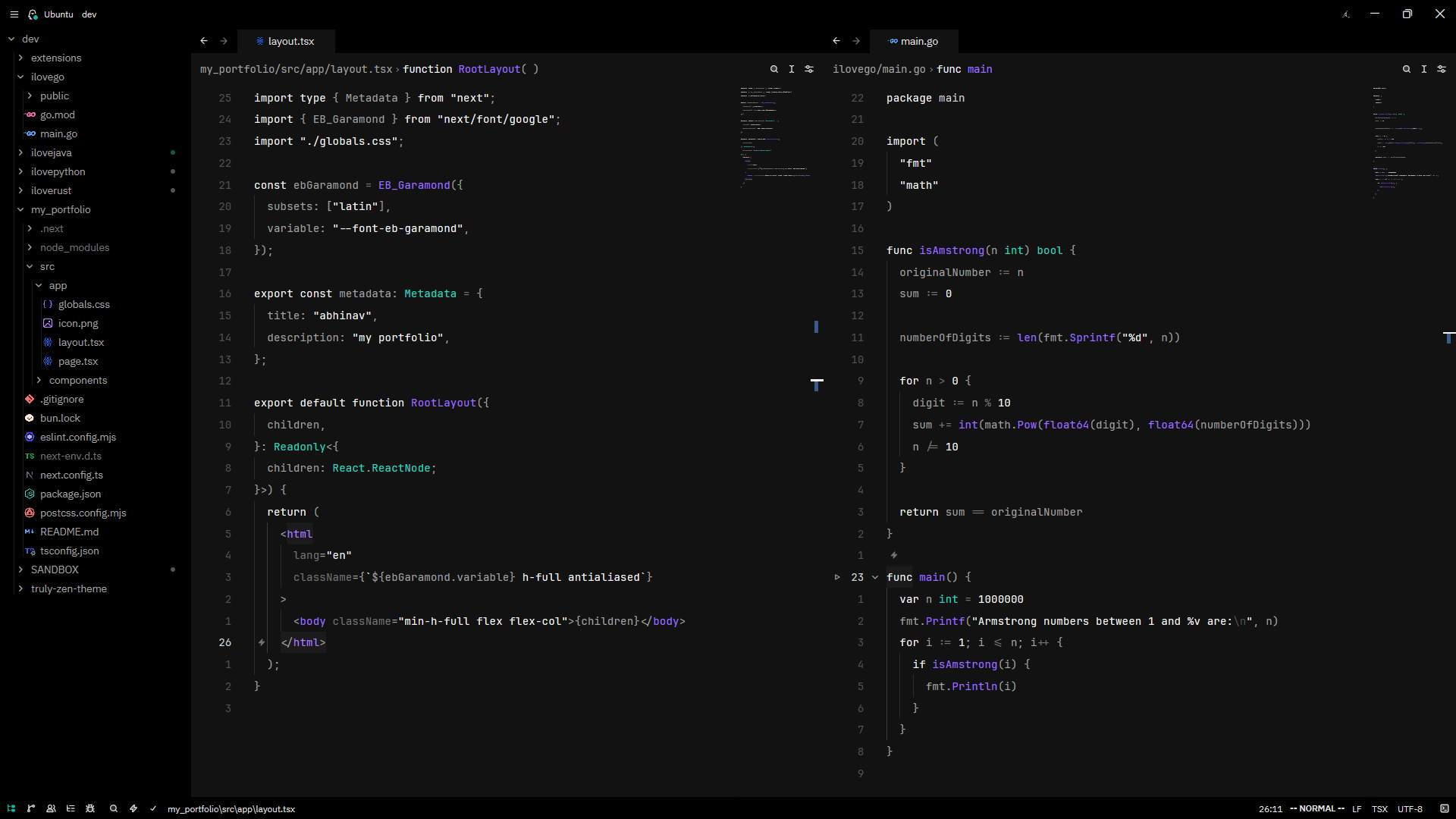
Truly Zen is what happens when you take a pure black canvas and sprinkle in teal accents like digital tea leaves. It's designed to disappear into the background so you can focus on what actually matters: your code.
The aesthetic:
- Pitch black backgrounds (#000000) because why waste pixels?
- Teal highlights (#14B8A6) that pop without screaming
- Soft grey text that doesn't strain your eyes at 3am
- Purple functions (#9D70FF) because life needs a little color
- White keywords for maximum readability
Two flavors included:
- Truly Zen Dark — the classic experience
- Truly Zen Dark Italics — same zen, but with italics on keywords and comments for extra flow state
Installation
From the Extension Store
- Open Zed
- Press
ctrl+shift+x(orcmd+shift+xon macOS) to open Extensions - Search for "Truly Zen"
- Click Install
- Select it from the theme selector with
ctrl+k ctrl+t
As a Dev Extension (for testing)
- Clone this repo:
git clone https://github.com/abhinaaaavvv/truly-zen-theme.git - Open Zed
- Open the command palette with
ctrl+shift+p - Run
zed: Install Dev Extension - Select the cloned directory
- Pick your theme from
ctrl+k ctrl+t
Manual Installation
- Copy
themes/truly-zen.jsonto:- macOS/Linux:
~/.config/zed/themes/truly-zen.json - Windows:
%USERPROFILE%\AppData\Roaming\Zed\themes\truly-zen.json
- macOS/Linux:
- Restart Zed
- Select the theme with
ctrl+k ctrl+t
Settings
If you want to set it as your default theme, add this to your settings.json:
{
  "theme": "Truly Zen Dark"
}
Or for the italics version:
{
  "theme": "Truly Zen Dark Italics"
}
For dark/light mode switching:
{
  "theme": {
    "dark": "Truly Zen Dark",
    "light": "One Light",
    "mode": "system"
  }
}
Color Palette
| Element | Color |
|---|---|
| Background | #000000 |
| Editor | #121212 |
| Text | #e5e5e5 |
| Accent | #14B8A6 (teal) |
| Functions | #9D70FF (purple) |
| Types | #2DD4BF (cyan) |
| Keywords | #F5F5F5 (white, italic) |
| Comments | #525252 (grey, italic) |
| Strings | #F5F5F5 (white) |
| Variables | #a3a3a3 (light grey) |
Terminal Colors
The theme includes a full set of terminal colors that match the aesthetic:
- Bright greens and cyans for that hacker vibe
- Classic reds for errors (obviously)
- Soft yellows for warnings
- The usual ANSI suspects, all tuned to play nice with the dark backgrounds
Contributing
Found a bug? Want to add something? PRs are welcome. Just keep the zen intact.
License
MIT — use it, modify it, make it your own.
Made with focus in mind. Now go ship something. ✨