Test Coverage Highlight

A Zed extension that highlights test coverage directly in the editor: uncovered lines red, partially covered lines yellow, and covered lines green (opt-in, off by default). The file's coverage percentage is shown as a code lens and on hover.
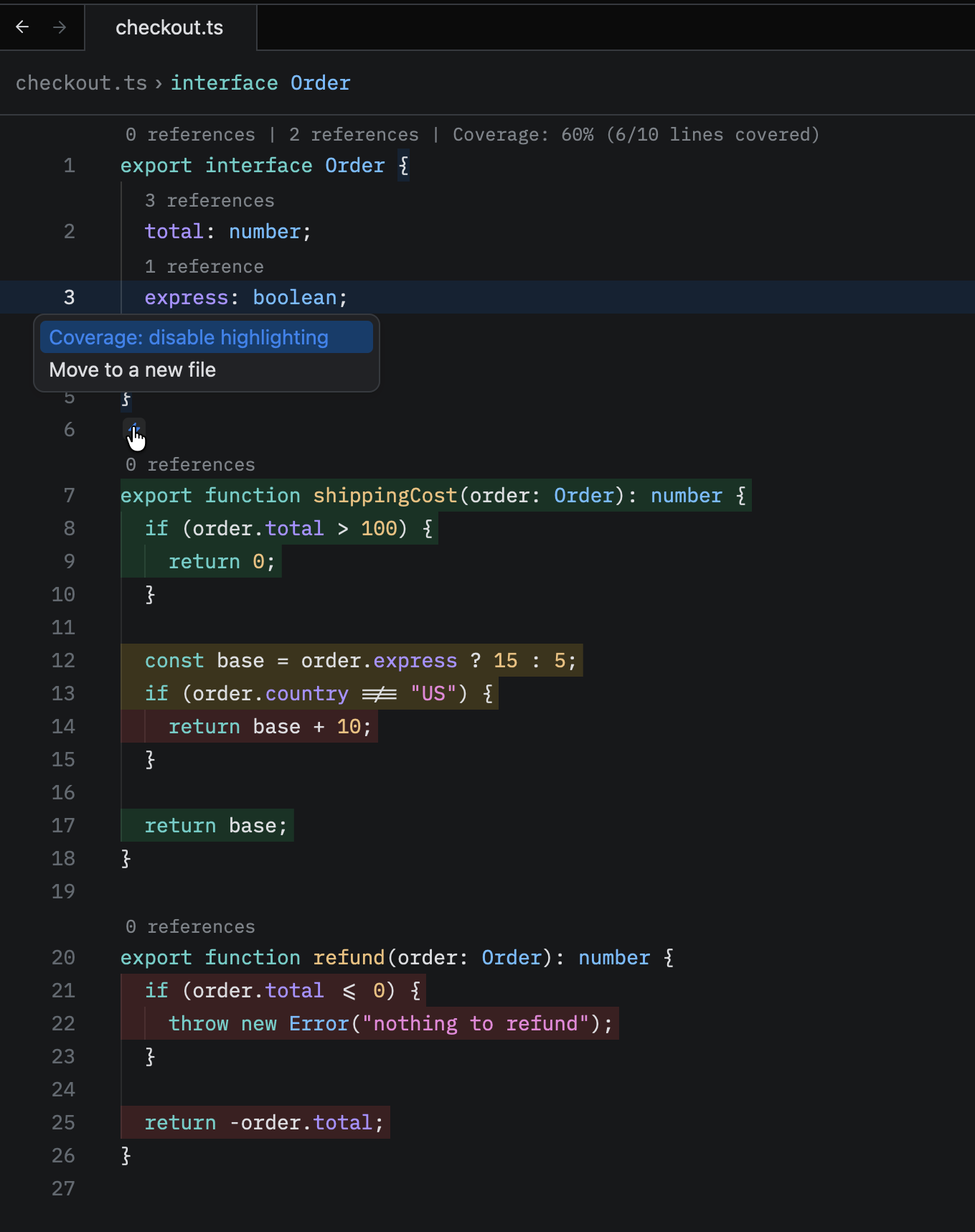
It reads lcov, jacoco, cobertura and clover reports, auto-discovers them across multi-module projects, and merges them. Java (jacoco), Kotlin, Scala, Groovy, Rust, JS/TS, Python, Go, C/C++, C#, Ruby, PHP and Dart are wired up.
Installation
In Zed, open the extensions view (
zed: extensions, orcmd-shift-xon macOS andctrl-shift-xon Linux and Windows), search for Test Coverage Highlight and click Install.Enable the rendering in your Zed
settings.json:{ "lsp_document_colors": "background" }Options:
"background"(recommended),"border","inlay", or"none".Open a project that contains a coverage report. The extension downloads the
covhllanguage server for your platform on first use, no manual setup needed.
How it works
Zed extensions are sandboxed WASM and cannot draw gutters or decorations. The
only way to color code is the LSP textDocument/documentColor request, which
Zed renders according to its global lsp_document_colors setting. So this
extension ships a small language server (covhl) that attaches alongside your
real language server and answers documentColor (and hover) from your
coverage reports.
Coverage summary (code lens)
The file's coverage, for example Coverage: 49% (70/142 lines covered), is
shown as a code lens above the first line. Clicking it toggles highlighting.
Zed keeps code lenses off by default, so enable them in settings.json:
{
  "code_lens": "on"
}
or run editor: toggle code lens. The same summary is also shown when hovering any line, no setting needed.
Coverage reports
Reports are discovered by file name at any depth, skipping node_modules,
venv, .venv, vendor and .git. Recognized names:
lcov.info, jacoco.xml, cobertura.xml, coverage.xml, cov.xml,
coverage.cobertura.xml, clover.xml.
Re-run your tests and the colors refresh automatically, no reload needed.
Settings
Configure under lsp.covhl.settings in Zed settings.json:
{
  "lsp": {
    "covhl": {
      "settings": {
        "enabled": true,
        "showHover": true,
        "showCodeLens": true,
        "autoRefresh": true,
        "alpha": 0.2,
        "coveragePath": "target/site/jacoco/jacoco.xml",
        "colors": {
          "covered": "#2ecc71",
          "uncovered": "rgba(231,76,60,0.35)",
          "partial": "hsl(48, 89%, 50%)"
        }
      }
    }
  }
}| Setting | Default | Description |
|---|---|---|
enabled |
true |
Highlighting switch. The hover has its own switch and stays on. |
showHover |
true |
Show the coverage percentage on hover. |
showCodeLens |
true |
Show the coverage code lens. Also needs Zed's "code_lens": "on". |
autoRefresh |
true |
Re-color open editors when a report changes. |
alpha |
0.2 |
Fill opacity (0 to 1) for colors that don't carry their own alpha. |
coveragePath |
unset | Pin a single report instead of auto-discovering. |
colors |
see below | Per-state colors in any CSS format (named, hex, rgb(), rgba(), hsl()), or null to not highlight that state. |
By default colors.covered is null: only uncovered (red) and partial
(yellow) lines are painted. Set "covered": "#2ecc71" to paint covered lines
too.
Changes apply live, without restarting the server.
Toggling highlighting
Open the code-action menu on any line (cmd-. / editor: toggle code actions)
and pick Coverage: disable highlighting (or enable). The hover keeps
working while highlighting is off. The enabled setting does the same thing
persistently.
Server binary
The extension downloads the prebuilt covhl binary for your platform from this
repo's GitHub Releases. To use a local build instead, put a covhl binary on
your $PATH. A binary on the $PATH takes priority over the downloaded one.
Development
server/        TypeScript language server (bun); parsers, tests, bun-compile
editors/zed/   the Zed extension (Rust/WASM shim that launches covhl)
cd server
bun install
bun test # unit + end-to-end
bun run compile # build the covhl binary for this platform -> dist/License
MIT © 2026 Hyyan Abo Fakher. See LICENSE.