
Cheerful darkness dusted with starlight contrasts.
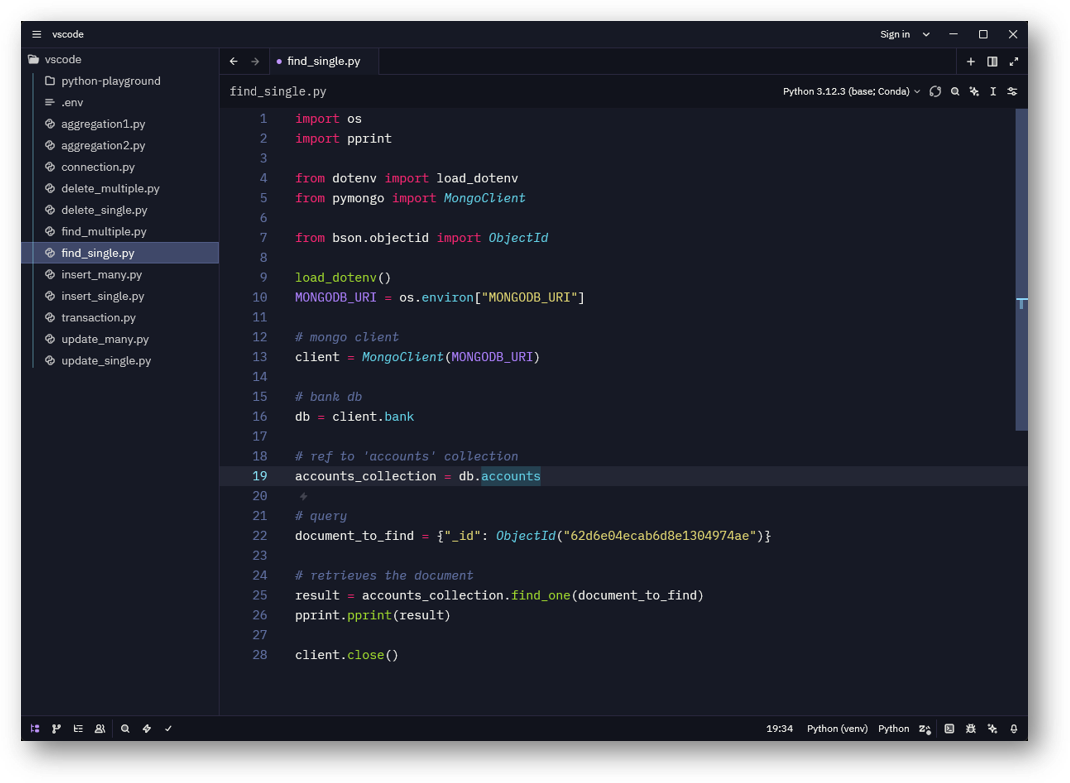
About
The following is a dark theme for Zed Editor that brings in a symbiotic link an inspiration from Monokai syntax with a darker Dracula palette. It has a contrasted background that gives a comfortable canvas that reduces eye strain during coding sessions, alongside vibrant accent colors that enhance the visual pleasure.
Color Philosophy
The theme uses a layered approach to backgrounds:
- Base:
#11131c(main background) - Surface:
#161925(editor, panels) - Elevated:
#161925(dialogs, menus)
Syntax colors draw from both worlds:
- Monokai’s readability for functions and strings
- Dracula’s vibrancy for comments and keywords (
#8BE9FD) - Purple accents for types and hints (
#BD93F9)
Installation
Via Zed Extensions (Recommended)
Check Zed extension marketplace from within the app.
Manual Installation
- Clone or download this repository
- Copy
sweetdracula.jsonto your Zed themes directory:- macOS/Linux:
~/.config/zed/themes/ - Windows:
%APPDATA%\Zed\themes\
- macOS/Linux:
- Restart the editor
- Open the theme selector (
cmd/ctrl + k,cmd/ctrl + t) - Select "Sweet Dracula"
Dev Extension Installation
- Clone or download this repository
- In Zed, open the Command Palette (
cmd/ctrl + shift + pand run "install dev extension" - Select the main repository folder
- Reload Zed or restart the editor
- Open the theme selector (
cmd/ctrl + k,cmd/ctrl + t) - Select "Sweet Dracula"
Support
Reach out to me via the profile addresses.
Sponsor

License
