Short Giraffe Theme
Minimalistic, dark and easy-to-eye syntax theme for VSCode, Zed, and your favorite terminals.
Built from the ground up, the Short Giraffe Theme uses a playful yet subtle color palette for a your coding experience.
Zed
- Run Zed: Extensions
- Search for Short Giraffe Theme and install
- Done 🎉
VSCode
- Open Extensions on the sidebar.
- Search for Short Giraffe Theme.
- Install & reload.
- ⌘ + ⇧ + p and type "Color Theme".
- Pick Short Giraffe from the list and hit enter.
- Done 🎉
iTerm2
- Download a theme:
- Open iTerm2 → Settings → Profiles → Colors
- Click "Color Presets..." dropdown → Import...
- Select the downloaded
.itermcolorsfile - Select the imported preset from the dropdown
Ghostty
Install the theme directly:
mkdir -p ~/.config/ghostty/themes && curl -fsSL "https://raw.githubusercontent.com/kumamaki/Short-Giraffe/main/src/ghostty/Short%20Giraffe" -o ~/.config/ghostty/themes/"Short Giraffe"Or download manually:
Then add to your Ghostty config (~/.config/ghostty/config):
theme = Short GiraffeOtty
Import and activate the default variant:
otty theme import "https://raw.githubusercontent.com/kumamaki/Short-Giraffe/main/src/otty/Short%20Giraffe.ottytheme" --activateOr from a local clone:
otty theme import "./src/otty/Short Giraffe.ottytheme" --activate
otty theme import "./src/otty/Short Giraffe Darker.ottytheme"
otty theme import "./src/otty/Short Giraffe High Contrast.ottytheme"
Download manually:
Switch later with otty config set theme short-giraffe (or short-giraffe-darker / short-giraffe-high-contrast).
Warp
Install the theme directly:
mkdir -p ~/.warp/themes && curl -fsSL "https://raw.githubusercontent.com/kumamaki/Short-Giraffe/main/src/warp/Short%20Giraffe.yaml" -o ~/.warp/themes/"Short Giraffe.yaml"Or download manually:
Then select the theme in Warp: Settings → Appearance → Themes
opencode
opencode loads themes from ~/.config/opencode/themes/. Install all three variants:
mkdir -p ~/.config/opencode/themes && curl -fsSL "https://raw.githubusercontent.com/kumamaki/Short-Giraffe/main/.opencode/themes/short-giraffe.json" -o ~/.config/opencode/themes/short-giraffe.json && curl -fsSL "https://raw.githubusercontent.com/kumamaki/Short-Giraffe/main/.opencode/themes/short-giraffe-darker.json" -o ~/.config/opencode/themes/short-giraffe-darker.json && curl -fsSL "https://raw.githubusercontent.com/kumamaki/Short-Giraffe/main/.opencode/themes/short-giraffe-high-contrast.json" -o ~/.config/opencode/themes/short-giraffe-high-contrast.jsonOr download manually:
Activate the theme by setting "theme": "short-giraffe" in your ~/.config/opencode/tui.json, or switch at runtime with /theme short-giraffe inside opencode.
Color Pallette
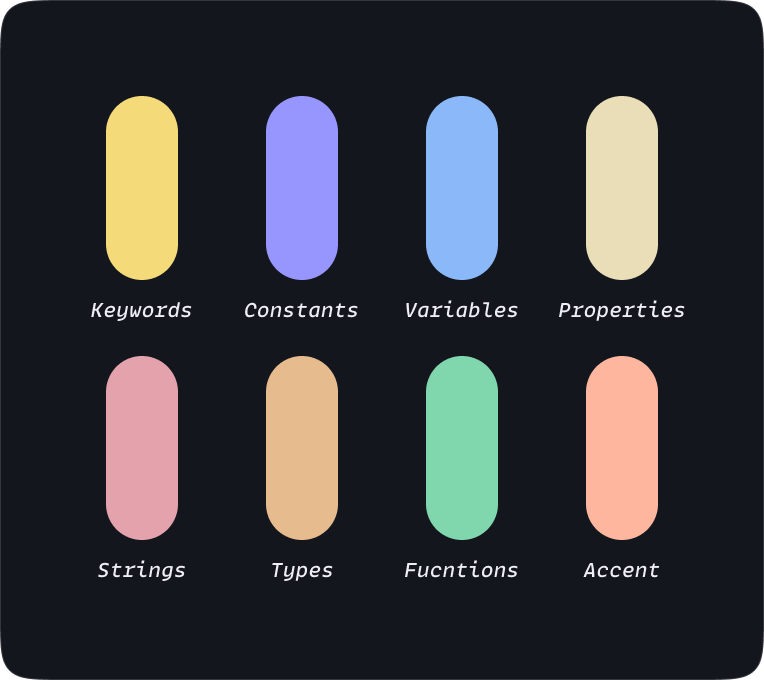
A harmonious blend of playful accents and soothing tones that will keep you focused and engaged.
Cheers to the Short Giraffes