Rust & Brown
English
A warm dark theme for Zed editor with brown tones and orange accents.
Description
A cozy color scheme designed for comfortable long-term coding sessions. Soft brown shades reduce eye strain, while orange accents add expressiveness to your code.
Also available for VS Code.
Screenshots
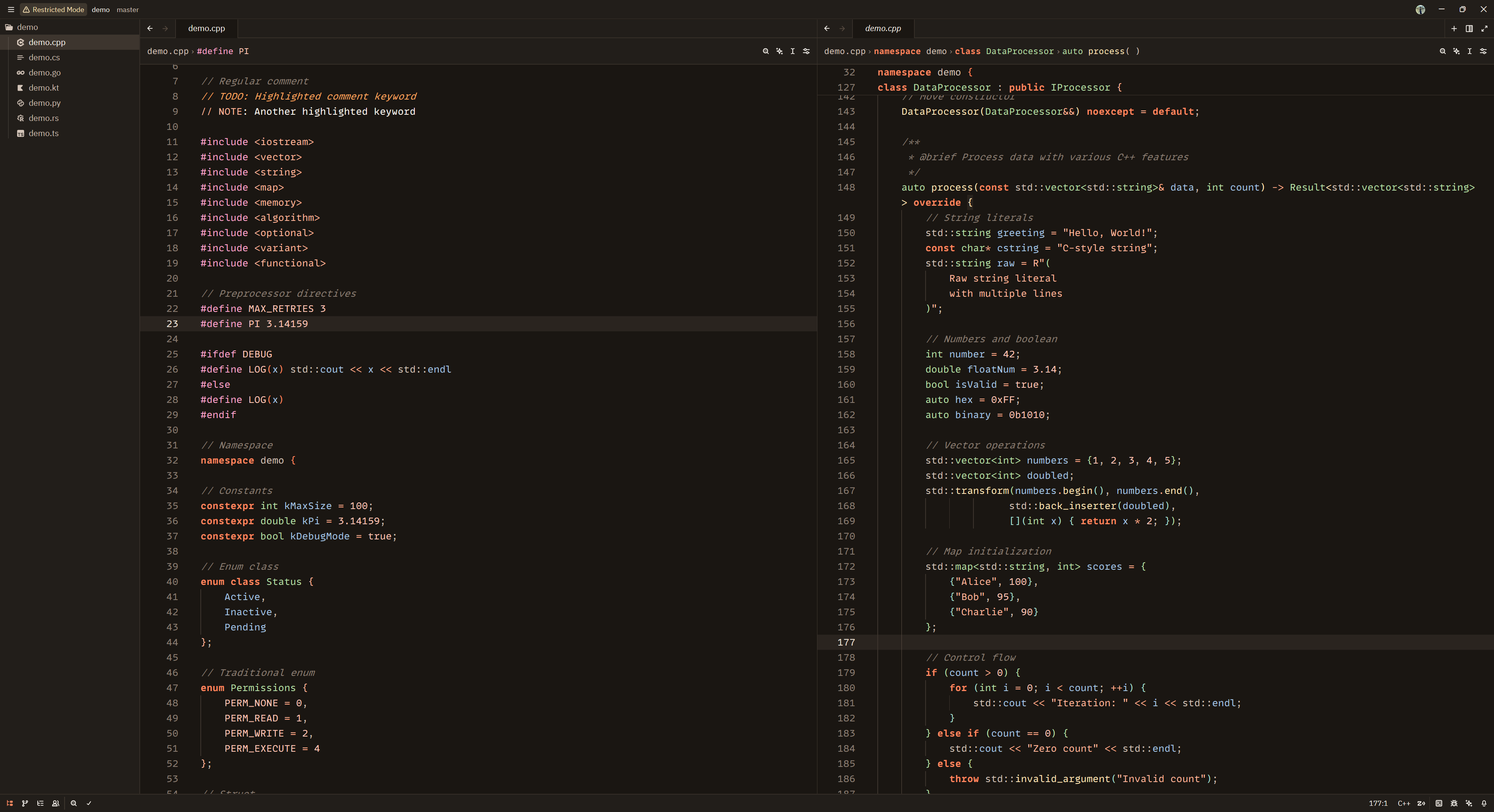
Installation
Option 1: Install as Extension (Recommended)
- Open Zed editor
- Press
Ctrl+Shift+P(Windows/Linux) orCmd+Shift+P(macOS) - Type
zed: extensions - Search for "Rust & Brown"
- Click Install
Option 2: Manual Installation
- Clone this repository or download the theme file
- Copy
themes/rust-and-brown.jsonto your Zed themes folder:- Windows:
%APPDATA%\Roaming\Zed\themes\ - macOS:
~/.config/zed/themes/ - Linux:
~/.config/zed/themes/
- Windows:
- Restart Zed
- Open Zed → Settings → Theme → select "Rust & Brown"
Option 3: Quick Install (macOS/Linux)
curl -o ~/.config/zed/themes/rust-and-brown.json https://raw.githubusercontent.com/LukianovII/rust-and-brown/master/themes/rust-and-brown.jsonOption 4: Quick Install (Windows PowerShell)
Invoke-WebRequest -Uri "https://raw.githubusercontent.com/LukianovII/rust-and-brown/master/themes/rust-and-brown.json" -OutFile "$env:APPDATA\Zed\themes\rust-and-brown.json"Color Palette
Editor
- Background:
#1a1612 - Text:
#fffbf5 - Accent:
#ff8860 - Muted text:
#d4c5b9
Syntax Highlighting
- Keywords:
#ff8860(bold) - Functions:
#ffe8b8 - Types:
#b8e0a8 - Variables:
#a8c8e8 - Strings:
#ffb89d - Numbers/Constants:
#ffc8b8 - Comments:
#8a7d72(italic) - Operators:
#ffb090 - Macros/Decorators:
#ffa8d0 - Interfaces/Enums:
#a8e0d0
Diagnostics
- Errors:
#ff9090 - Warnings:
#ffe8b8 - Success:
#b8e0a8 - Info:
#a8c8e8
Author
LukianovII
License
MIT
Russian
Тёплая темная тема для Zed с коричневыми тонами и оранжевыми акцентами.
Описание
Уютная цветовая схема, созданная для комфортной длительной работы. Мягкие коричневые оттенки снижают нагрузку на глаза, а оранжевые акценты добавляют выразительности коду.
Также доступна для VS Code.
Скриншоты
Установка
Вариант 1: Установка как расширение (Рекомендуется)
- Откройте Zed
- Нажмите
Ctrl+Shift+P(Windows/Linux) илиCmd+Shift+P(macOS) - Введите
zed: extensions - Найдите "Rust & Brown"
- Нажмите Install
Вариант 2: Ручная установка
- Клонируйте репозиторий или скачайте файл темы
- Скопируйте
themes/rust-and-brown.jsonв папку тем Zed:- Windows:
%APPDATA%\Roaming\Zed\themes\ - macOS:
~/.config/zed/themes/ - Linux:
~/.config/zed/themes/
- Windows:
- Перезапустите Zed
- Откройте Zed → Settings → Theme → выберите "Rust & Brown"
Вариант 3: Быстрая установка (macOS/Linux)
curl -o ~/.config/zed/themes/rust-and-brown.json https://raw.githubusercontent.com/LukianovII/rust-and-brown/master/themes/rust-and-brown.jsonВариант 4: Быстрая установка (Windows PowerShell)
Invoke-WebRequest -Uri "https://raw.githubusercontent.com/LukianovII/rust-and-brown/master/themes/rust-and-brown.json" -OutFile "$env:APPDATA\Zed\themes\rust-and-brown.json"Цветовая палитра
Редактор
- Фон:
#1a1612 - Текст:
#fffbf5 - Акцент:
#ff8860 - Приглушённый текст:
#d4c5b9
Подсветка синтаксиса
- Ключевые слова:
#ff8860(жирный) - Функции:
#ffe8b8 - Типы:
#b8e0a8 - Переменные:
#a8c8e8 - Строки:
#ffb89d - Числа/константы:
#ffc8b8 - Комментарии:
#8a7d72(курсив) - Операторы:
#ffb090 - Макросы/декораторы:
#ffa8d0 - Интерфейсы/перечисления:
#a8e0d0
Диагностика
- Ошибки:
#ff9090 - Предупреждения:
#ffe8b8 - Успех:
#b8e0a8 - Информация:
#a8c8e8
Автор
LukianovII
Лицензия
MIT