Rosewood for Zed
Rosewood is a dark theme family for Zed with two distinct moods: the original warm Dusk pair and a colder, more experimental Fathom pair. It is designed to feel atmospheric without sacrificing readability, so long coding sessions stay calm instead of flat, gray, or harsh.
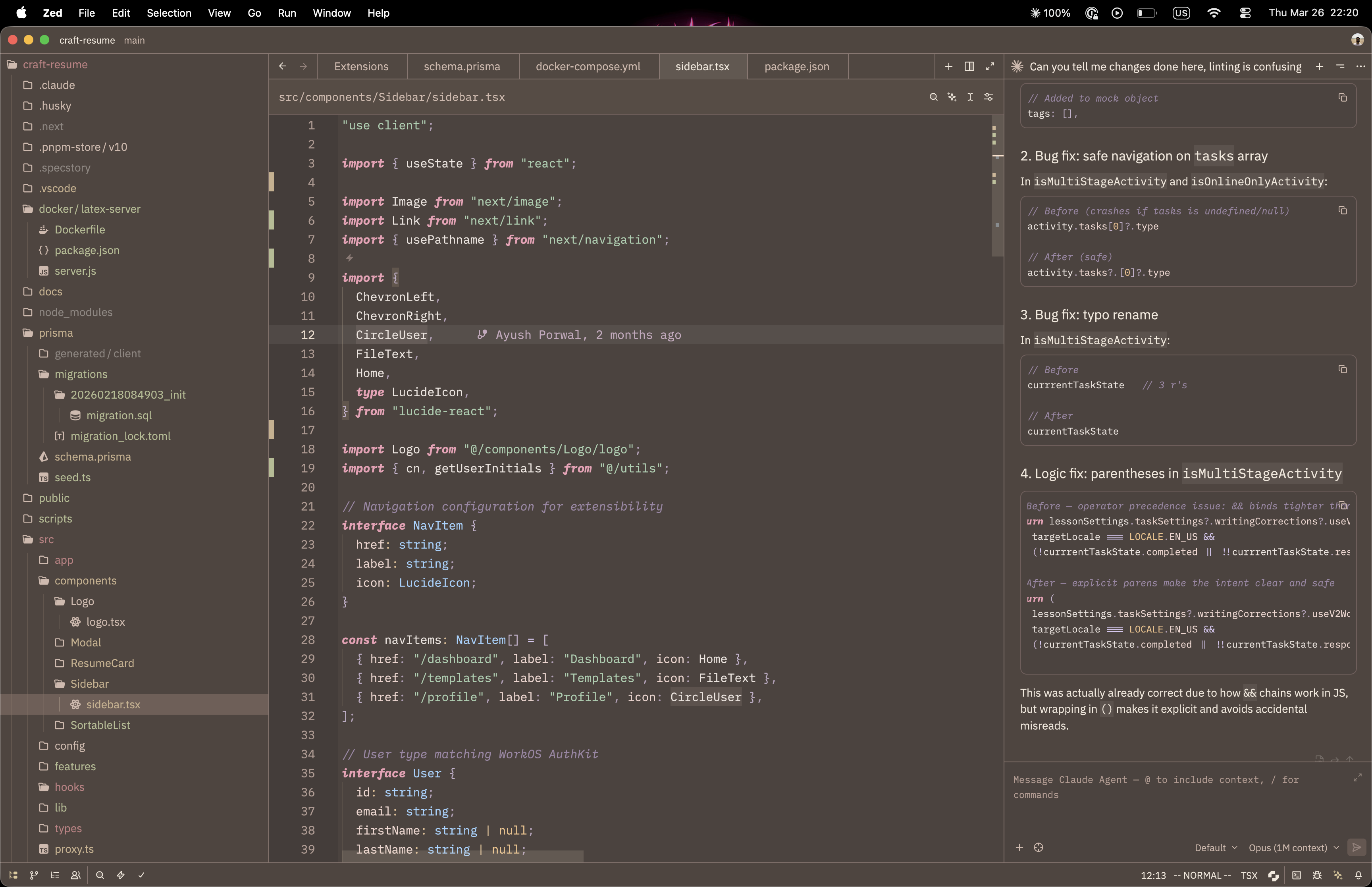
Rosewood Dusk
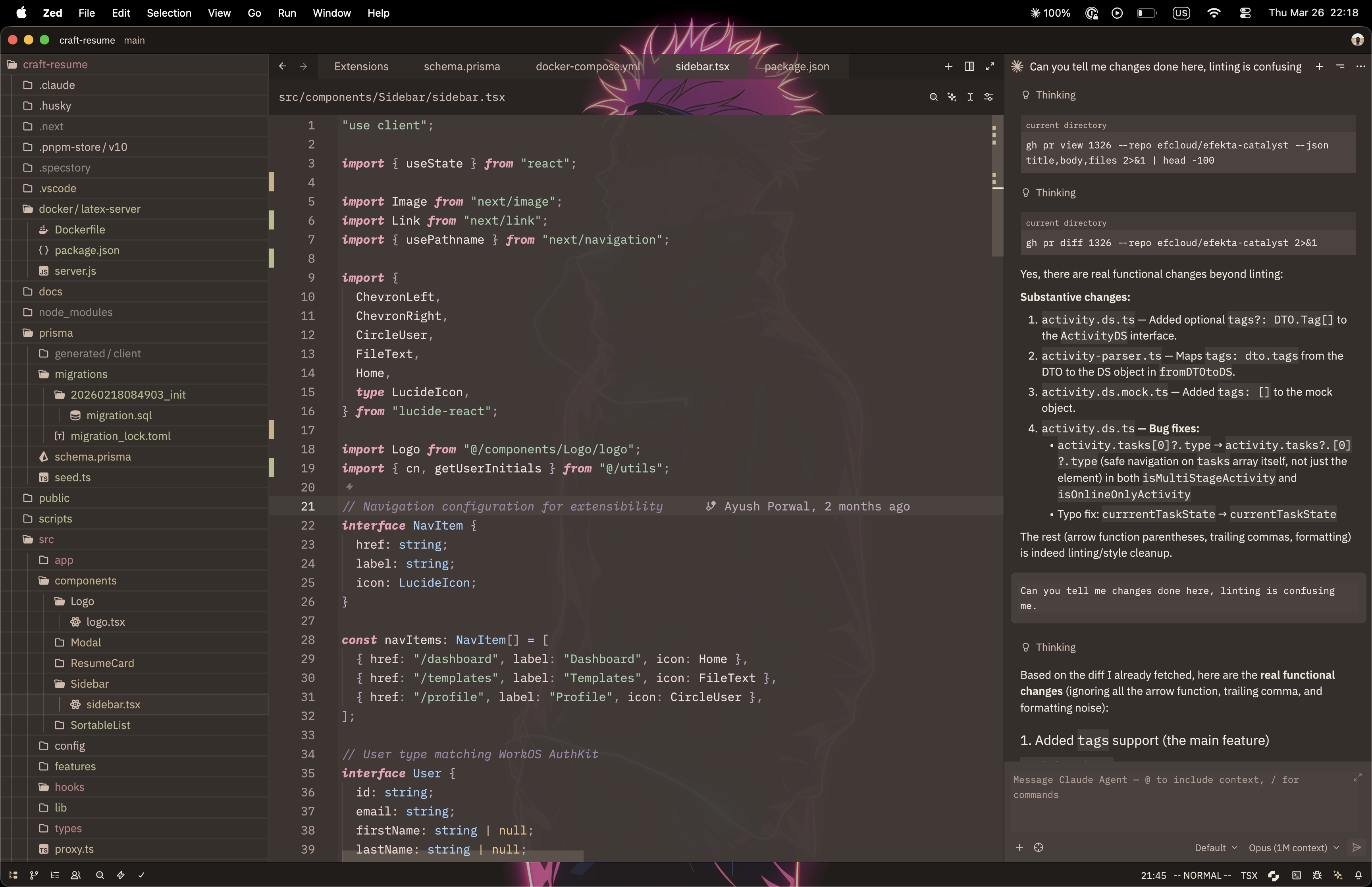
Rosewood Dusk Transparent
Features
Rosewood is made for people who want a dark theme with character.
Two different dark moods instead of one safe default
Rosewood Duskkeeps the family warm: layered browns, muted rose borders, olive-tinted neutrals, and soft ivory text.Rosewood Fathomgoes colder and stranger: mineral slate chrome, deep ink editor surfaces, brass accents, sea-glass highlights, and cooler diagnostics.
Readable pastel syntax
- Dusk leans into rose, sage, powder blue, and lavender.
- Fathom swaps in coral keywords, seafoam strings, brass constants, sky-blue types, and violet hints.
- Comments stay muted and italic in both branches, visible without stealing focus.
Transparent variants that still feel usable
Rosewood Dusk Transparentkeeps the same palette, but strips the chrome back so your wallpaper can become part of the experience.Rosewood Fathom Transparentdoes the same for the cooler branch, keeping enough density in the editor while letting the outer chrome breathe.
UI, terminal, and diagnostics all match
- Each branch has its own matching terminal ANSI palette instead of feeling bolted on.
- Git states, success colors, warnings, errors, hints, and collaboration cursors are tuned to fit each branch's visual language.
Included Themes
Rosewood Duskfor a warm, blurred dark workspace.Rosewood Dusk Transparentfor a glassy setup with wallpaper showing through the editor chrome.Rosewood Fathomfor a colder mineral-dark workspace with brass, sea-glass, and violet accents.Rosewood Fathom Transparentfor the same palette with translucent chrome.
VS Code
The repo now includes first-pass VS Code exports for all non-transparent variants under vscode/themes/.
It is generated from the Zed source theme with:
npm run build:vscodeThe VS Code ports keep each source palette, syntax, diagnostics, and terminal colors aligned as closely as possible, but adapt Zed-only blur/transparency behavior into standard VS Code workbench colors.
Test locally in VS Code
- Open this repo in VS Code.
- Press
F5and choose Run Rosewood Theme Extension. - In the Extension Development Host window, open the theme picker and select any
Rosewood ...theme.
Package a local VSIX
If you want to install it like a normal VS Code extension:
npm install
npm run package:vscode
Then install the generated .vsix file from VS Code with Extensions: Install from VSIX....
Installation
Install locally in Zed
Clone the repository:
git clone https://github.com/ayush-porwal/zed-rosewood-theme.gitOpen Zed.
Open the Extensions page with
Cmd+Shift+Xon macOS orCtrl+Shift+Xon Linux/Windows.Click Install Dev Extension.
Select the cloned
zed-rosewood-themedirectory.
Install from the extension registry
If Rosewood is published to the Zed extension registry, open the Extensions page and search for Rosewood.
Activation
Once installed:
- Open the theme selector with
Cmd+K Cmd+Ton macOS orCtrl+K Ctrl+Ton Linux/Windows. - Choose Rosewood Dusk, Rosewood Dusk Transparent, Rosewood Fathom, or Rosewood Fathom Transparent.
You can also switch themes from Settings → Theme.
Why Rosewood
Rosewood is for people who like dark themes, but are tired of sterile monochrome palettes. It gives you two directions on purpose: one warm and tactile, one cooler and more cinematic, both with clear syntax separation and transparent variants that look intentional instead of gimmicky.
If you want Zed to feel a little more tactile, a little less sterile, and a lot more personal, Rosewood is the point.
Feedback
The theme is still evolving, and colors are subject to change based on iteration and community feedback.
Issues, ideas, collaborations, and pull requests are welcome.
License
See the LICENSE file for details.