Pinkzuna
A Zed editor theme inspired by the world's first virtual YouTuber, Kizuna AI.
Two variants — a warm, cheerful light theme and a cold, dramatic dark theme.


Variants
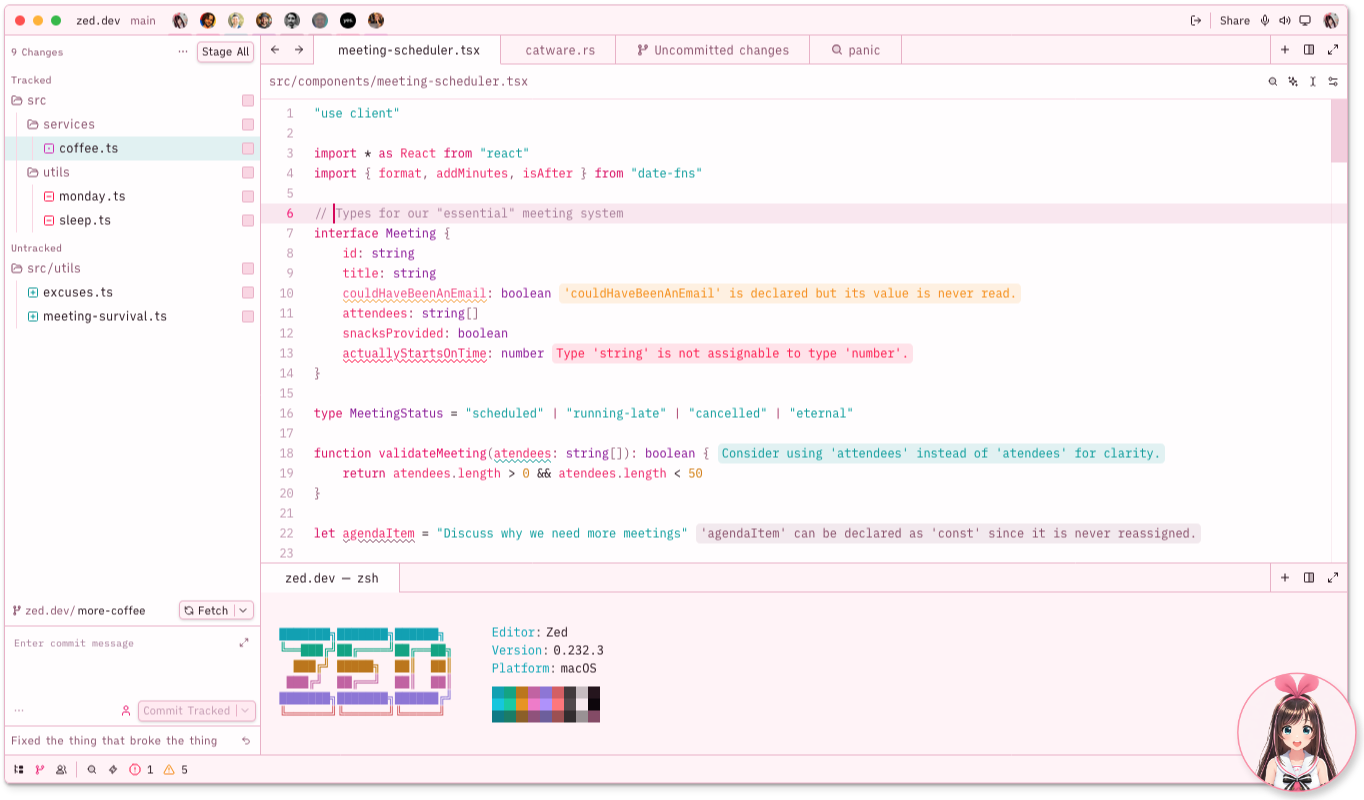
Pinkzuna Classic — Kizuna AI
Warm pinkish-white backgrounds, dark plum foreground, saturated pinks for syntax. Cheerful and bright — daytime Kizuna AI energy.
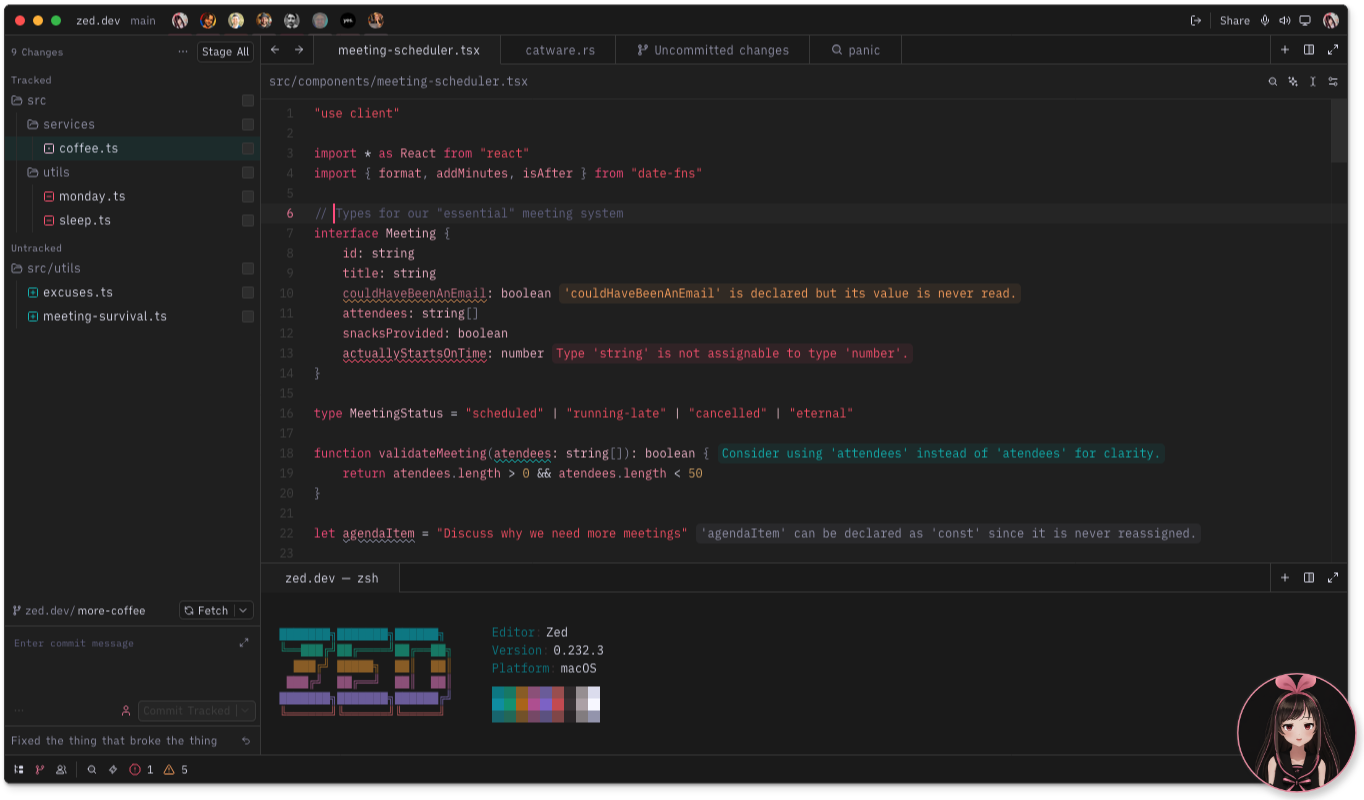
Pinkzuna Black — Black AI
Cold charcoal-black backgrounds, hot-pink syntax anchors, garnet strings. Dramatic and sharp — a tribute to Kizuna's dark doppelganger.
Installation
Via Zed Extension Marketplace (recommended)
- Open Zed and press
Cmd+Shift+X(macOS) /Ctrl+Shift+X(Linux) to open Extensions. - Search for Pinkzuna.
- Click Install.
- Open the theme selector:
Cmd+K Cmd+T→ choose Pinkzuna Classic or Pinkzuna Black.
Manual Installation
- Clone or download this repository:
git clone https://github.com/memiux/pinkzuna-zed.git - Copy the theme file into your Zed themes directory:
cp pinkzuna-zed/themes/pinkzuna.json ~/.config/zed/themes/ - Restart Zed (or reload the window).
- Open the theme selector:
Cmd+K Cmd+T→ choose Pinkzuna Classic or Pinkzuna Black.
Recommended Icon Theme
Pairs beautifully with Charmed Icons.
Add to your settings.json:
"icon_theme": {
  "mode": "dark",
  "light": "Light Charmed Icons",
  "dark": "Soft Charmed Icons"
}
Quick Toggle with Profiles
Set up named profiles in settings.json to switch between Classic and Black in one command:
"profiles": {
  "Light": {
    "theme": "Pinkzuna Classic",
    "icon_theme": "Light Charmed Icons"
  },
  "Dark": {
    "theme": "Pinkzuna Black",
    "icon_theme": "Soft Charmed Icons"
  }
}
Toggle via the command palette: > switch profile.
Theme Overrides
Fine-tune specific tokens without leaving settings.json. These are the recommended overrides for bracket highlight visibility:
"theme_overrides": {
  "Pinkzuna Classic": {
    "editor.document_highlight.bracket_background": "#00A1A146"
  },
  "Pinkzuna Black": {
    "editor.document_highlight.bracket_background": "#FF5B6F60"
  }
}
Bond Affinity Tuner
The Bond Affinity Tuner is a standalone browser tool that lets you dial in your own saturation and lightness adjustments before exporting a customized theme JSON.
Opening the tuner
open bond-affinity-tuner.html   # macOS
xdg-open bond-affinity-tuner.html   # Linux
Or simply double-click bond-affinity-tuner.html in Finder / your file manager.
Using the tuner
| Feature | Description |
|---|---|
| Theme tabs | Switch between Classic and Black at the top — each tab has independent slider state |
| Group sliders | 8–9 color groups per theme (backgrounds, muted, text, pink, warm, etc.), each with S delta and L delta controls (±40) |
| Live preview | Mock Zed editor with tab bar, gutter, and syntax-highlighted Ruby updates in real time |
| Accent swatches | Displays the 8 accents[] colors for the active theme |
| Status bar | Shows git and diagnostic color samples |
| Copy JSON | Copies the adjusted theme to your clipboard |
| Download | Saves pinkzuna.json to your Downloads folder |
Applying your custom theme
- Click Download (or Copy JSON) in the tuner.
- Place the downloaded file in
~/.config/zed/themes/:cp ~/Downloads/pinkzuna.json ~/.config/zed/themes/ - Reload Zed — your adjusted variant appears in the theme selector.
Note:
themes/pinkzuna.jsonis generated output — edit colors only through the tuner, never directly in the JSON file.
Contributing
- All color edits go through
bond-affinity-tuner.html— never editthemes/pinkzuna.jsondirectly. - After changing colors, update
CLAUDE.mdto keep it in sync with the tuner. - Use uppercase hex (
#FF2266, not#ff2266) everywhere. - Open a PR against
main.
🎀