
NPM Update Checker for Zed IDE
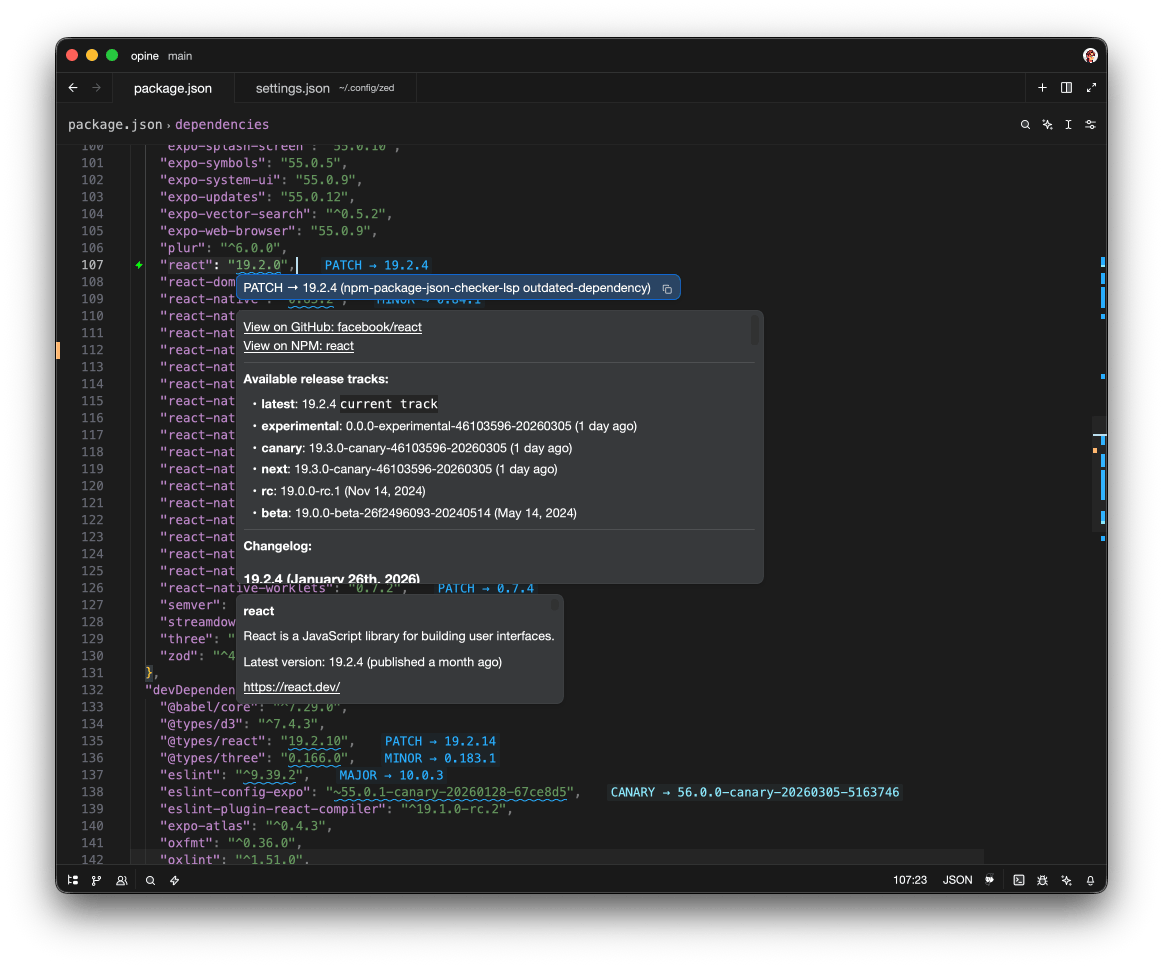
Highlights outdated npm packages and changelogs in package.json files minimalistically using a Rust LSP.

Features
- 📥 Highlights outdated packages in package.json in real-time
- 🔍 Changelog between current version and latest version
- Parses and combines GitHub releases and/or CHANGELOG.md
- Shows changes from current to latest if possible
- Goes direct without API calls with rate limits
- 🔧 Offers auto-complete to update the package
- Shows available release tracks
- Includes fallback update targets from the current track (older than latest, newer than current)
- 📚 Distinguishes between release tracks (major/minor/patch/canary/nightly/beta/alpha/experimental)
Auto-completions
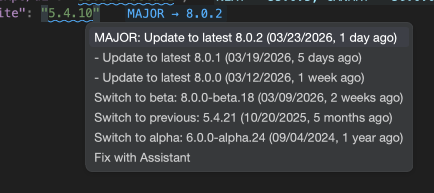 Zed auto-complete to upgrade quickly with the option to show multiple recent releases on current track.
Optional loading Indicator
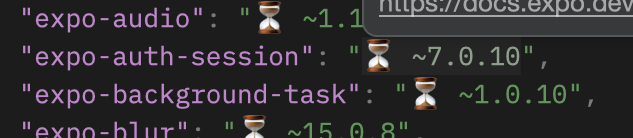
The extension-side loading hint is enabled by default, but Zed disables inlay hints globally by default. Enable both layers in your Zed settings:
// settings.json
{
  "inlay_hints": {
    "enabled": true,
    "show_value_hints": true
  },
  "lsp": {
    "npm-package-json-checker-lsp": {
      "settings": {
        "show_loading_hints": true
      }
    }
  }
}
Install via Zed Extensions
- Open Zed
cmd+shift+pand select zed: extensions- Search/select NPM Update Checker and Install
Manual Installation
- Clone this repository
- Build the LSP:
cargo build --locked --release -p npm-package-json-checker-lsp cp target/release/npm-package-json-checker-lsp . - In Zed: Command Palette → "zed: install dev extension" → select this directory
The extension prefers this copied root binary during dev-extension testing, so it will not silently substitute a previously published GitHub asset.
To test the checkout locally, run cargo test --locked --workspace --all-features and cargo fmt --all -- --check. The release workflow also builds the extension for wasm32-wasip2.
Misc
- Caches packages and attempts to not re-pull them if it doesn't need to
Configuration
Configure the extension in your Zed settings.json under lsp.npm-package-json-checker-lsp.settings.
Make sure to restart Zed or the LSP server after making changes.
| Key | Type | Default | Description |
|---|---|---|---|
registry_url |
string |
"https://registry.npmjs.org" |
Registry base URL used for package metadata lookups (manual override; .npmrc/env discovery is not used). |
cache_ttl_seconds |
number |
300 |
Cache TTL in seconds (0 disables cache reuse). |
max_concurrent_requests |
number |
10 |
Max concurrent registry requests (minimum 1). |
max_concurrent_changelog_requests |
number |
4 |
Max concurrent changelog requests (minimum 1). |
request_timeout_seconds |
number |
15 |
HTTP timeout in seconds (minimum 1). |
show_loading_hints |
boolean |
true |
Show loading inlay hints while package version metadata is being fetched. Zed's global inlay_hints.enabled setting must also be enabled. |
show_experimental_tracks |
boolean |
false |
Show extra hint diagnostics for newer non-current tracks (including experimental/pre-release tracks). |
recent_releases_in_code_actions |
number |
2 |
Number of fallback "recent release" code actions on the current track (0 disables them). |
date_tag_mode |
"date" | "timeago" | "date+timeago" |
"date+timeago" |
Controls how release dates are rendered in labels/changelog headers. |
date_format |
string |
"%d/%m/%Y" |
chrono date format string used when date_tag_mode includes date output. |
Default settings snippet:
{
  "lsp": {
    "npm-package-json-checker-lsp": {
      "settings": {
        "registry_url": "https://registry.npmjs.org",
        "cache_ttl_seconds": 300,
        "max_concurrent_requests": 10,
        "max_concurrent_changelog_requests": 4,
        "request_timeout_seconds": 15,
        "show_loading_hints": true,
        "show_experimental_tracks": false,
        "recent_releases_in_code_actions": 2,
        "date_tag_mode": "date+timeago",
        "date_format": "%d/%m/%Y"
      }
    }
  }
}