Mineral Themes for Zed
A dark theme family for Zed with 10 background variants, each shipped in a normal and a high-contrast flavor — 20 themes in a single family. Syntax colors are built on the classic open Material palette, with per-variant desaturation, per-variant terminal ANSI colors, and an accent that stays consistent across every surface.
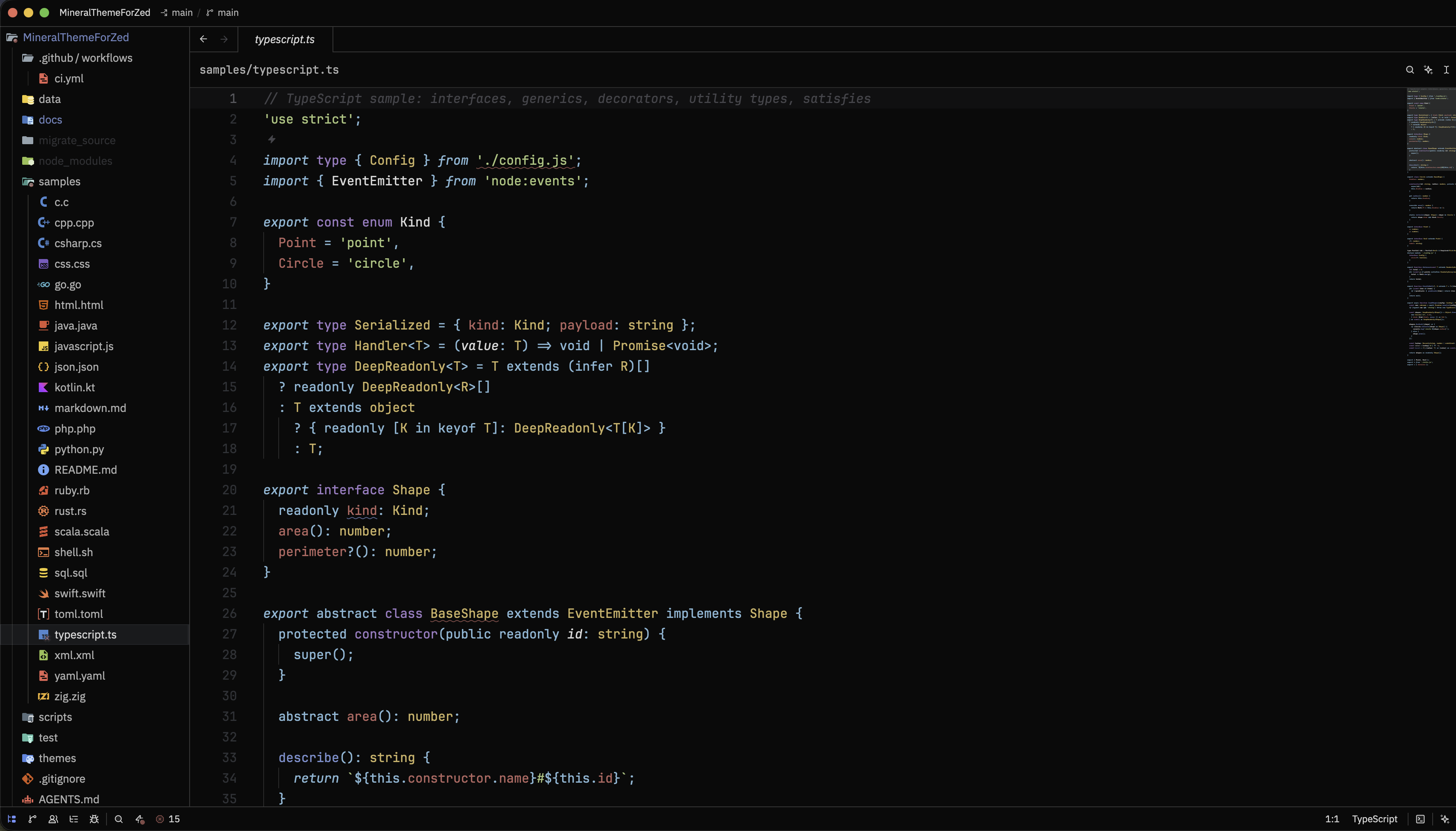
Themes
| Variant | Editor background | Variant | Editor background |
|---|---|---|---|
| Carbon | #0A0A0A |
Ocean | #0F111A |
| Anthracite | #151719 |
Palenight | #232634 |
| Clay | #1B1818 |
Sand | #131210 |
| Deepforest | #111816 |
Teal | #263238 |
| Graphene | #212121 |
Montana | #130F15 |
Every variant also has a High Contrast edition (e.g. Mineral Theme Carbon High Contrast) with lifted editor backgrounds and contrast-tuned UI colors. Themes appear in the picker as one family: Mineral Theme.
Design notes
- Syntax highlighting is mapped per Tree-sitter capture, not per TextMate scope: declaration keywords (purple), control flow (cyan italic), types (yellow), functions (blue), properties/members (red), strings (green), numbers (orange), comments (gray italic).
- Italic support for comments, doc comments, control keywords, imports and markup — use a font with real italics (e.g. JetBrains Mono) for the intended look.
- The accent is baked in as blue
#5393FFand drivestext.accent,icon.accent, links, active-element tints and the active search match. It is a static theme — Zed themes have no runtime — so the accent can be changed per theme via Zed'stheme_overrides(below) or at build time. - Terminal colors are a full per-variant ANSI palette (normal / bright / synthesized dim rows).
- UI colors were translated key-by-key from the VS Code original (~140 Zed style keys, coverage-tested), including git decorations, diff highlights, scrollbar, search matches and editor document highlights.
Installation
From the Releases page
Each tagged version ships a ready-to-use bundle (extension.toml + generated themes/) as a release asset:
- Download
mineral-theme-<version>.zipfrom the Releases page. - Unzip it anywhere.
- In Zed: open the Extensions page (
zed: extensions) → Install Dev Extension → select the unzipped folder. - Open the theme selector (
cmd-k cmd-t/ctrl-k ctrl-t) and pick a variant.
Note: Zed has no side-loadable package format (no vsix equivalent) — extensions are either loaded as dev extensions from a directory or installed from the extension registry. The release zip is exactly that directory, zipped.
As a dev extension (from source)
git clone <this repository>
cd MineralThemeForZed
npm install
npm run build        # generates themes/mineral-theme.json
Then Install Dev Extension in Zed and select the repository root (the folder containing extension.toml).
Changing the accent color
The baked accent can be overridden two ways:
Per theme, in Zed settings (works everywhere, no rebuild):
{
  "theme_overrides": {
    "Mineral Theme Carbon": {
      "text.accent": "#FF669Eff",
      "icon.accent": "#FF669Eff",
      "link_text.hover": "#FF669Eff",
      "element.active": "#FF669E26"
    }
  }
}
At build time (regenerates the whole family with another accent):
npx tsx scripts/build-themes.ts --accent=pink # 14 preset names or any #hexDevelopment
The repository root is the extension root. themes/mineral-theme.json is generated — edit data/ and the mapping tables in scripts/, never the output.
extension.toml            Zed extension manifest (id: mineral-theme)
themes/                   generated theme family (single file, 20 themes)
data/                     color source of truth (palettes, per-variant UI colors, HC overrides, accent spec)
scripts/ui-map.ts         VS Code → Zed UI color mapping (all 139 One-theme keys, coverage-tested)
scripts/syntax-map.ts     syntax keys → palette roles (46 canonical keys + 7 extras)
scripts/build-themes.ts   builder + JSON Schema validation + accent baking
test/                     vitest: schema, determinism, palette, accent, HC assertions
Commands:
npm run verify    # typecheck + build (ajv schema validation) + 36 tests
npm run build     # themes only
npm test          # assertions only
The build is deterministic (byte-identical output for identical input) and validates against the official Zed theme JSON schema. CI runs the full pipeline and repackages the downloadable bundle on every push.
Development Agent
This extension was built end-to-end with the ZCode coding agent, powered by GLM-5.3-Flash (Z.ai) — research, milestone planning, the data pipeline and mapping tables, the 20 generated themes, the test suite, pixel-level rendering comparisons between VS Code and Zed, and these very docs. Human review covered every decision that mattered: naming, accent color, scope, and whether to publish.
Acknowledgments
- Color values derive from the author's own VS Code theme, built on the open Material color palette (as popularized by Material Theme and Vira Theme).
- The syntax key set follows the conventions of Zed's built-in One theme; the theme format targets the official Theme JSON Schema v0.2.0.
License
Released under the MIT License.
中文说明见 README_zh.md。