


Lucide Icons for Zed
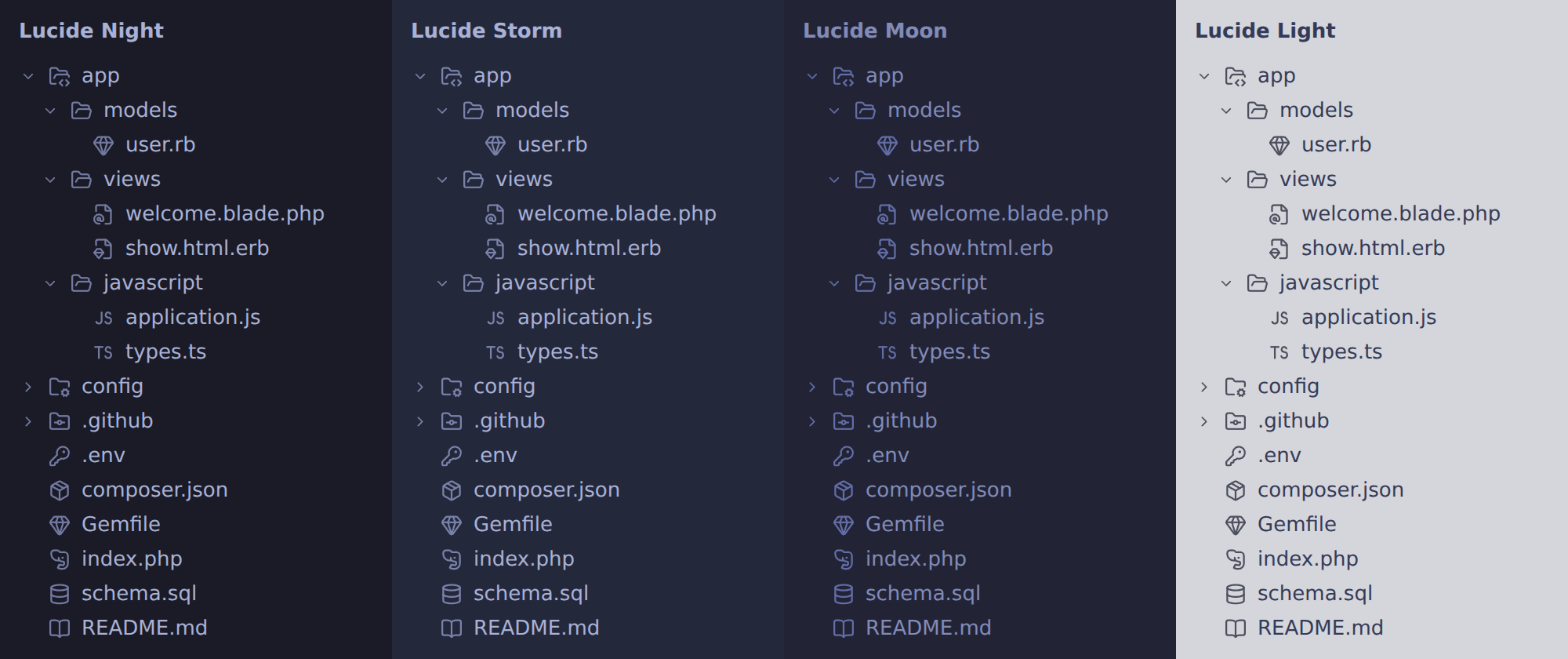
A file and folder icon theme for Zed built from Lucide: round caps, Lucide's 24×24 grid, and spacing that matches the official set. One variant per Tokyo Night theme:
- Lucide Night – icon colour
#737AA2, Tokyo Night's blue-grey - Lucide Storm – icon colour
#7982A9, Storm's own muted text colour - Lucide Moon – icon colour
#636DA6, Moon's purple-leaning comment colour - Lucide Light – icon colour
#4C505E, the colour Tokyo Night Light uses for Zed's own icons
Slightly smaller and thinner than pure Lucide, to match Zed's own icons.
Design rules
- Bare symbol = a language or the thing itself:
JS,TS,GO,M↓(Markdown),#(CSS),{ }(JSON), elephant (PHP), gem (Ruby), devil horns (Metal shaders – \m/), snowflake (Nix), moon (Lua), λ (Haskell), chef's hat (mise – as in mise en place), image, font… - File with a corner symbol = a file that wraps something else: templates (HTML/XML
<>, Blade@, ERB gem). - Corner symbols use Lucide's standard corner size (~10×10), so they weigh the same.
- Every file type Zed knows has a Lucide icon; languages without their own icon fall back to a generic
<>(code), never to Zed's default icons. - Generic symbols only – no brand logos.
Install (dev extension)
- Put this folder somewhere permanent – Zed loads a dev extension straight from it.
- Command palette →
zed: install dev extension→ choose this folder (the one containingextension.toml). - Command palette →
icon theme selector: toggle→ pick the variant that matches your theme.
Follow your system appearance in settings.json:
"icon_theme": { "mode": "system", "light": "Lucide Light", "dark": "Lucide Night" }Change or extend
Everything is generated by build.py from a clone of the Lucide repo:
git clone --depth 1 https://github.com/lucide-icons/lucide.git /tmp/lucide
python3 build.py /tmp/lucide
Then open zed: extensions and click Rebuild on Lucide Icons. If something fails, check zed: open log.
Settings at the top of build.py:
| Setting | What it does |
|---|---|
APPEARANCES |
Theme names and the fixed icon colour per variant |
PADDING |
Extra room around the 24px grid; higher = smaller and thinner icons (0 = pure Lucide) |
STROKE_WIDTH |
Line width; Lucide's default is 2 |
CHOICES |
Alternatives for Blade, ERB and Markdown (kept in custom/) |
FILE_ICONS, FILE_SUFFIXES, FILE_STEMS, NAMED_DIRS, ZED_KEYS |
Which icon goes with which file or folder |
Custom icons (JS/TS/GO and M↓ lettering, Blade/ERB/HTML files, the framed Markdown mark as an alternative, open variants of named folders) live in custom/.
Why fixed colours?
- Zed renders icon-theme SVGs as images, so they can't inherit the editor theme's colour or react to hover.
build.pybakes in a fixed colour per variant; change it inAPPEARANCESfor other themes.
Changelog
See CHANGELOG.md.
Credits
Icons © Lucide contributors (ISC; portions MIT via Feather) – see LICENSE. elephant-face comes from Lucide Lab.
This is an unofficial community project, not affiliated with or endorsed by Lucide.