English | 日本語
Kyokko Theme
Kyokko (極光, kyokkō, "aurora") is a calm navy dark theme lit by aurora cyan and green.
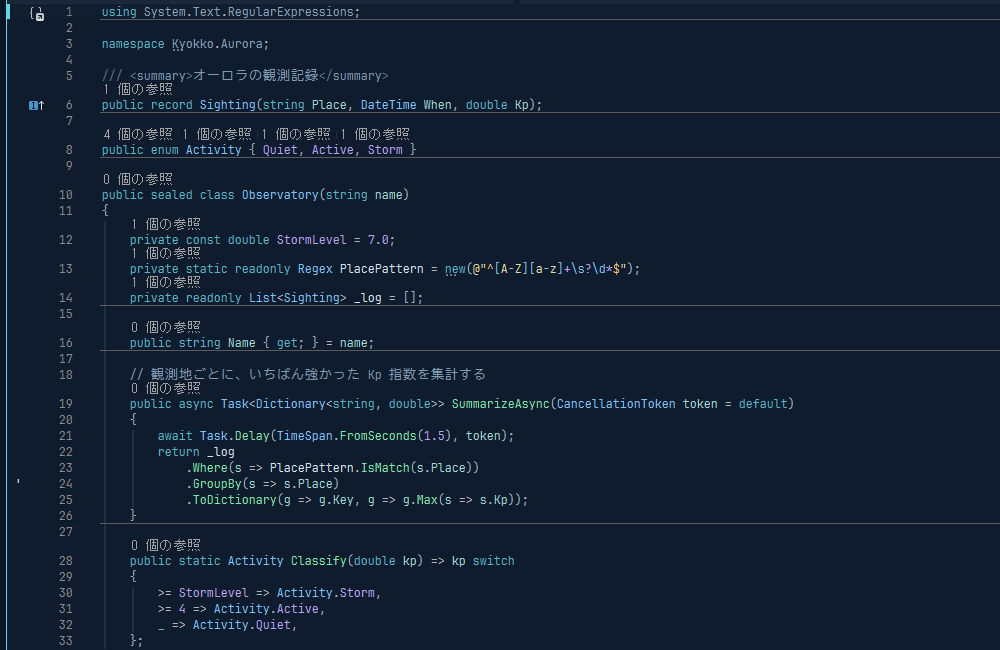
- Navy background with one step lighter surfaces for tool windows, tabs and status bar
- Cyan keywords, green functions, sky-blue types, sand-colored strings, lilac numbers
- Comments in plain (non-italic) blue-gray, so Japanese comments stay readable
- Every code color is 5.9:1 or higher against the background (WCAG AA)
- In Visual Studio and VS Code, the whole IDE is navy (no gray panels), and errors, warnings, find matches and the debugger's current line keep their usual meaning in dark tints
| Target | Status | File |
|---|---|---|
| Visual Studio 2026 | Visual Studio Marketplace | vs/ |
| Zed | Submitted to the Zed extension registry (zed-industries/extensions#8157, in review) | zed/ |
| Windows Terminal | Working | themes/windows-terminal/kyokko.json |
| VS Code | Visual Studio Marketplace | vscode/ |
Install
- Visual Studio 2026: install Kyokko Theme from the Marketplace (or Extensions > Manage Extensions, search for "Kyokko"), restart Visual Studio, then choose Tools > Theme > Kyokko.
- VS Code: install Kyokko Theme from the Marketplace (or search for "Kyokko" in the Extensions view), then choose Kyokko with Preferences: Color Theme (
Ctrl+K Ctrl+T). - Zed and Windows Terminal: see below.
Palette
| Role | Color |
|---|---|
| Background / surface / selection | #0f1c2e / #16263b / #24425e |
| Text / comment | #d4e4ec / #7f9bb0 |
| Keyword / function / type | #56b6c6 / #7ee8a8 / #7cc4f8 |
| String / number | #e6d9a2 / #b9a3f0 |
| Property, parameter | #9fd9d0 |
How this repo works
palette.json is the single source of truth. Every theme file is generated from it:
node scripts/build.mjs          # regenerate vs/Kyokko.vstheme, vscode/themes/, zed/ and themes/, print a contrast report
node scripts/build.mjs --check  # fail if a generated file is out of date (CI runs this)
Do not edit the generated files by hand; change palette.json (or the mapping in scripts/build.mjs) and rebuild.
Visual Studio 2026
Requirements: Visual Studio 2026 with the Visual Studio extension development workload.
- Open
Kyokko.slnxand press F5. An experimental instance of Visual Studio starts with the theme installed. - In the experimental instance, choose Tools > Theme > Kyokko.
- To try token changes live, use Tools > Options > Environment > Visual Experience > Theme colors, then copy the values you like back into
scripts/build.mjs.
The .vstheme sets the new Visual Studio 2026 semantic tokens (Shell, ShellInternal) and falls back to the built-in Dark theme for anything not listed. Editor colors, including Roslyn semantic colors such as property and parameter names, use the classic editor categories.
Each push builds the VSIX on GitHub Actions; download it from the run's Artifacts.
The Marketplace page is vs/marketplace/overview.md with the screenshots next to it, published with vs/publishManifest.json:
& "C:\Program Files\Microsoft Visual Studio\18\Community\VSSDK\VisualStudioIntegration\Tools\Bin\VsixPublisher.exe" publish -payload vs\bin\Release\net48\Kyokko.vsix -publishManifest vs\publishManifest.json -personalAccessToken <token>VS Code
vscode/ is a VS Code extension (dekunocode.kyokko-theme): package.json, the Marketplace page README.md with its screenshots in images/, CHANGELOG.md, and the generated themes/kyokko-color-theme.json, LICENSE and icon.png (copied from vs/Resources/Icon.png).
To try it, run
code --extensionDevelopmentPath=<repo>\vscodeand choose Kyokko in Preferences: Color Theme.To build the
.vsix(Node.js 18+; CI builds it on every push too):cd vscode npx @vscode/vsce package # writes kyokko-theme-<version>.vsix
To publish to the Visual Studio Marketplace (publisher dekunocode), create a personal access token in Azure DevOps (User settings > Personal access tokens, Organization: All accessible organizations, Scopes: Marketplace > Manage), then:
cd vscode
npx @vscode/vsce login dekunocode      # paste the token when asked
npx @vscode/vsce publish --packagePath kyokko-theme-1.0.0.vsix
Or upload the .vsix at marketplace.visualstudio.com/manage (New extension > Visual Studio Code), which needs no token. For a new release, bump version in vscode/package.json, add a CHANGELOG.md entry and package again.
Zed
zed/ is a Zed extension (kyokko-theme): extension.toml, a copy of the license (Zed checks it inside the extension directory) and the generated themes/kyokko.json.
- To try it, run zed: install dev extension and select the
zedfolder, then pick Kyokko in the theme picker. - Or copy
zed/themes/kyokko.jsonto%APPDATA%\Zed\themes\.
When releasing a new version, bump version in zed/extension.toml and update the entry in zed-industries/extensions (path = "zed").
Windows Terminal
Paste the contents of themes/windows-terminal/kyokko.json into schemes in settings.json, then set "colorScheme": "Kyokko".