Graphite
A charcoal theme for Zed, adapted from a reference screenshot. Graphite is the name of this adaptation; the original screenshot's theme name is unknown.
Status: 0.1.0, locally validated as a development extension. Official registry publication is pending.
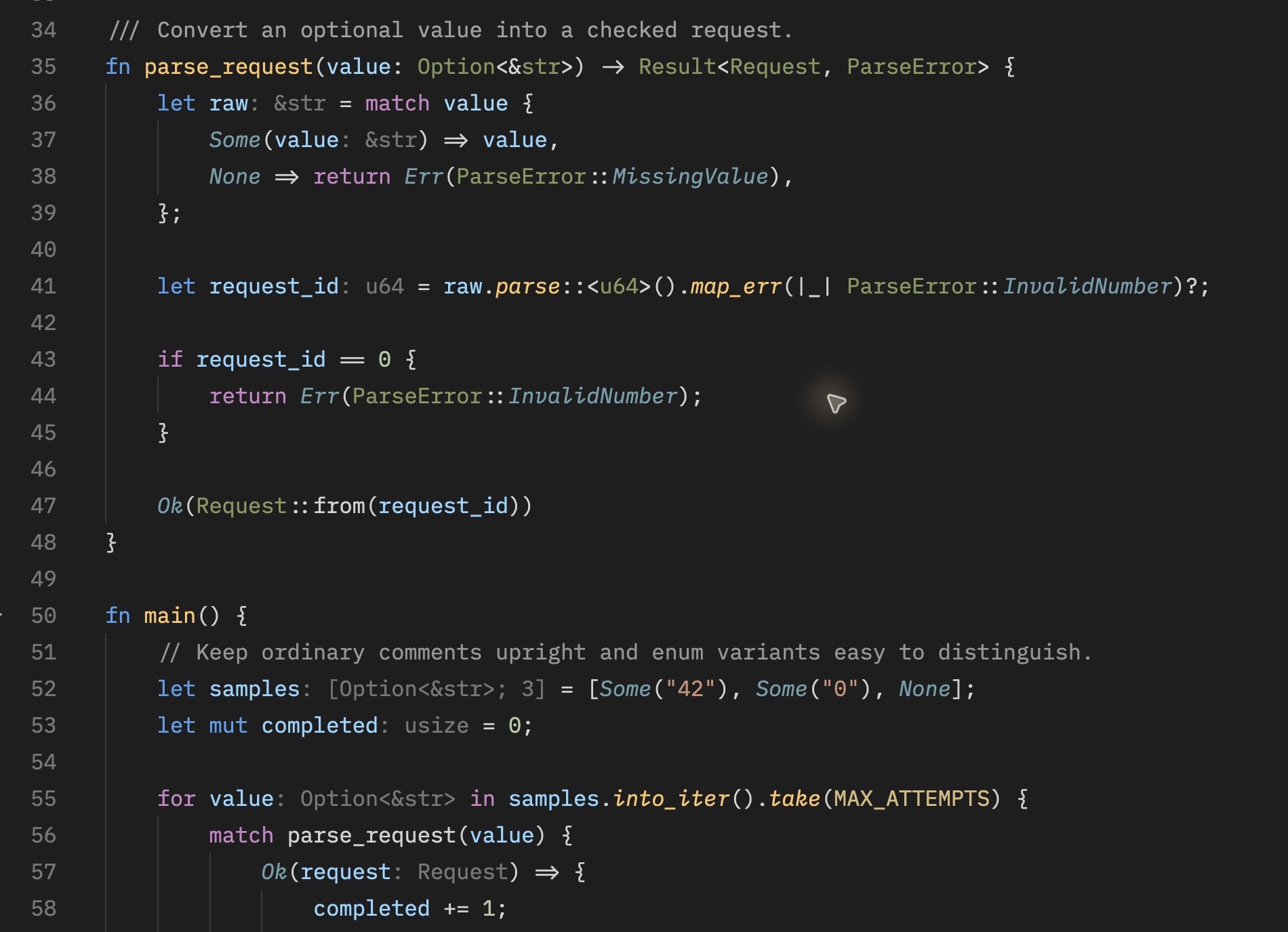
Native Rust preview in Zed 1.23.2 on macOS, using Lilex at 16 px and weight 400. The example runs in a dependency-free Cargo project with the optional Rust combined semantic highlighting and three rules from settings.example.json.
Install and remove
Currently, use the development installation below. Once Graphite is available in the official registry, search for Graphite in Extensions and select Install instead.
git clone https://github.com/lazyanubis/zed-graphite.gitIn Zed, open Extensions → Install Dev Extension and select the checkout containing extension.toml. Run theme selector: toggle and choose Graphite. Keep the checkout available while using the development extension. See the official development workflow.
To remove it, choose another theme, then select Uninstall for Graphite in Extensions. Manually merged settings are not removed with the extension.
This extension supplies only a theme. It contains no executable extension code, Rust/WASM module, or language queries.
Palette and typography
| Element | Color |
|---|---|
| Editor background | #1e1e1e |
| Keywords | #47a2ed |
| Control flow | #cc85c6 |
| Parameters | #94dbfd |
| Variables | #8cd7ff |
| Types | #86985d |
| Traits and interfaces | #8d91dc |
| Function definitions and methods | #ffc66d |
| Enum variants, italic | #6da1ab |
Comments are upright. Ordinary code does not force a font weight, so your editor font setting can apply. Fonts are personal settings rather than part of the theme; Lilex, 16 px, weight 400 is an optional starting point when Lilex is installed.
Rust highlighting and optional settings
settings.example.json is optional. Review and merge only the desired fields into existing settings; never replace the whole settings file. It selects Graphite, suggests the font above, and enables combined semantic highlighting for Rust. The extension does not apply these settings automatically.
The example's empty keyword rule leaves keyword styling to the syntax layer, preserving the blue/purple distinction. Function and method declaration rules retain the upright gold definition style. These rules are global and can affect other languages where semantic tokens are enabled. See Zed's semantic token documentation.
The built-in Rust syntax queries recognize control flow and trait positions, but classify capitalized identifiers such as Ok, Err, and None as types. With language-server semantic tokens, enumMember can use the italic variant style and parameter references can receive their parameter color. This depends on language-server support and project context; a standalone Rust file may not receive full semantic information. The theme cannot guarantee a pixel-identical reproduction of another editor's classification. The Rust queries and default semantic rules are the reference for these mappings.
Examples and validation
Open examples/preview.rs or examples/preview.ts to inspect declarations, calls, types, variants, constants, numbers, strings, booleans, and comments. They are neutral, standalone examples with no external dependencies.
Assisted desktop verification on 2026-10-09 covered installation and selection, Rust semantic rendering, TypeScript syntax rendering, readable search matches and selections, standard and bright terminal ANSI colors, and uninstallation. Rust variants were blue-gray italic, definitions upright gold, method calls italic gold, comments upright, types olive, and constants pale gold. TypeScript semantic highlighting was not enabled; its classifications differ, including white function declarations in the checked example. Uninstallation returned Zed to its default theme; reinstallation and theme selection also succeeded. See PUBLISHING.md for the tested theme content and exact scope.
MIT © 2026 Anubis.