Gas Plasma



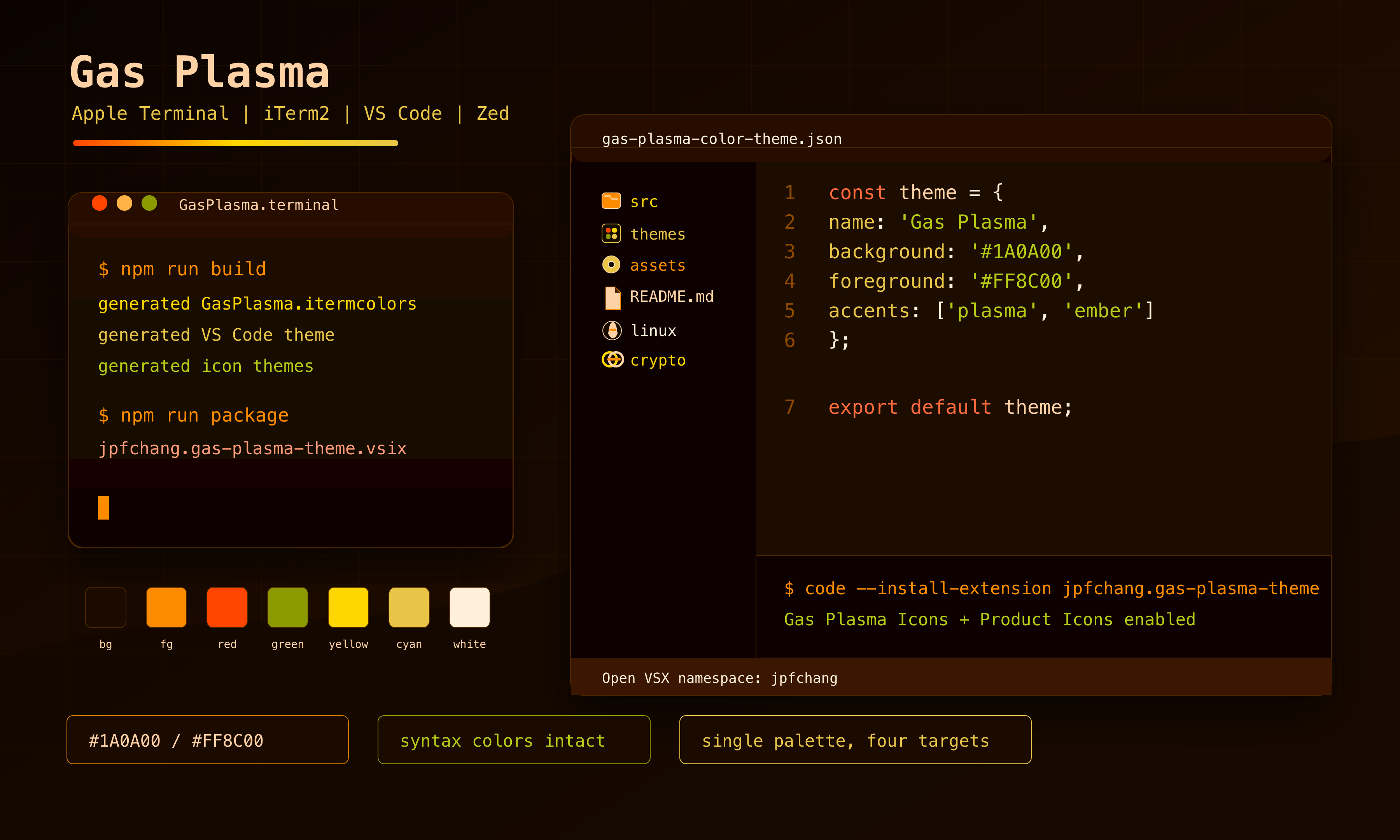
Gas Plasma is an orange-dominant dark theme for Apple Terminal, iTerm2, VS Code, Open VSX-compatible editors, and Zed.
The project ships one shared palette across terminal profiles, VS Code and Zed color themes, VS Code and Zed file icon themes, a VS Code product icon theme, a generated logo, and a generated documentation site.
Contents
Install
Apple Terminal
- Download
GasPlasma.terminalfrom this repository or the latest GitHub Release. - Open the file to import the profile into Terminal.
- Set "Gas Plasma" as the default profile from Terminal > Settings > Profiles if desired.
Manual import: Terminal > Settings > Profiles > ... > Import... and select GasPlasma.terminal.
iTerm2
- Download
GasPlasma.itermcolorsfrom this repository or the latest GitHub Release. - Open iTerm2 > Settings > Profiles > Colors.
- Choose Color Presets... > Import... and select
GasPlasma.itermcolors. - Select
GasPlasmafrom Color Presets....
VS Code and Open VSX
Install the published extension:
code --install-extension jpfchang.gas-plasma-themeOr install a local VSIX from a GitHub Release:
code --install-extension jpfchang.gas-plasma-theme-0.1.0.vsixExtension id: jpfchang.gas-plasma-theme
After installation, enable the companion icon themes from the command palette:
- Preferences: File Icon Theme >
Gas Plasma Icons - Preferences: Product Icon Theme >
Gas Plasma Product Icons
Zed
Install Gas Plasma Theme and Gas Plasma Icons from the Zed extensions store after the marketplace PR has been reviewed and merged.
For local testing, install each generated extension directory as a Zed dev extension:
zed/gas-plasma-themezed/gas-plasma-icons
Theme Package
| Asset | Purpose | Source |
|---|---|---|
GasPlasma.terminal |
Apple Terminal profile | generate-theme.swift, src/palette.json |
GasPlasma.itermcolors |
iTerm2 color preset | scripts/build.mjs, src/palette.json |
themes/gas-plasma-color-theme.json |
VS Code color theme | scripts/build.mjs, src/palette.json |
icons/file/gas-plasma-icon-theme.json |
VS Code file icon theme | scripts/build.mjs, src/icon-manifest.json |
icons/product/gas-plasma-product-icon-theme.json |
VS Code product icon theme | scripts/build.mjs, @vscode/codicons |
zed/gas-plasma-theme/ |
Zed color theme extension | scripts/build.mjs, src/palette.json |
zed/gas-plasma-icons/ |
Zed file icon theme extension | scripts/build.mjs, src/icon-manifest.json |
assets/logo.*, assets/mockup.*, docs/index.html |
Brand and documentation assets | scripts/build.mjs |
File icons use recognizable upstream language and ecosystem logo geometry where available, with restrained Gas Plasma color treatment for contrast. Product icons are generated from VS Code Codicons to preserve the original editor UI icon language.
Language coverage includes C, C++, Objective-C, Pascal, Python, Vala, C#, Java, PHP, Go, Swift, JavaScript, TypeScript, HTML, CSS, Rust, Ruby, Dart, Kotlin, Scala, Lua, R, Zig, Perl, Haskell, Elixir, Erlang, Clojure, F#, SQL, Vue, Svelte, PowerShell, Terraform/HCL, Nix, Julia, Fortran, Ada, COBOL, assembly, Groovy, Crystal, Nim, OCaml, Reason, Elm, MATLAB, VB, Verilog/VHDL, LaTeX, GraphQL, WASM, Astro, Pug, Handlebars, and EJS.
Architecture
The repository is organized so generated files can be reproduced from source data and scripts.
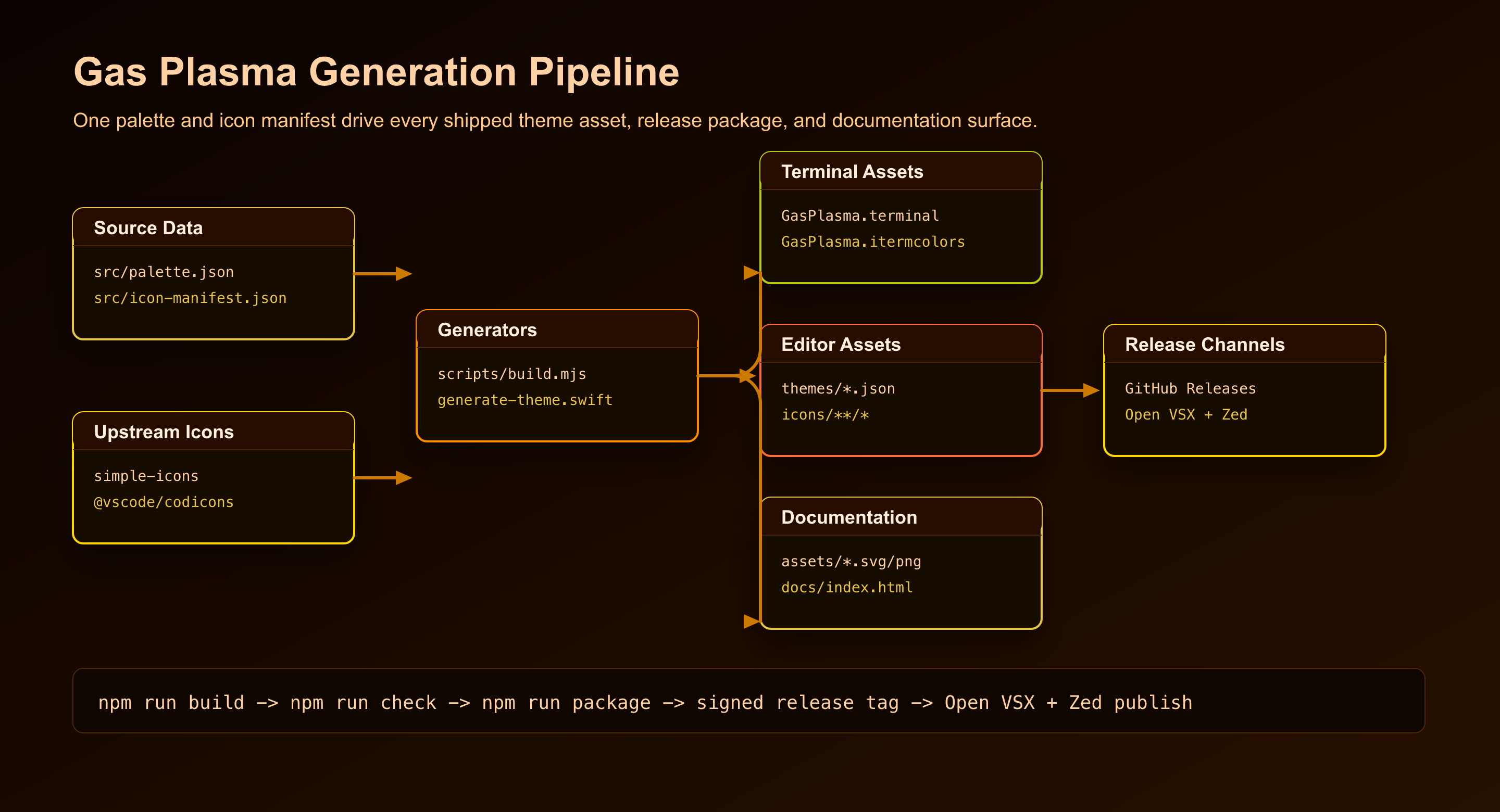
The generated site lives in docs/ for GitHub Pages. The extension package intentionally excludes build sources, docs sources, local editor metadata, and AI-assistant local state through .vscodeignore.
Development
Requirements:
- macOS 26.4 or later for Apple Terminal profile generation.
- Node.js 22 or later for extension packaging and generated assets.
- Swift 6 or later with Xcode command-line tools for
GasPlasma.terminal.
Install dependencies and rebuild every generated asset:
npm ci
npm run build
npm run check
Create a local VSIX package:
npm run packagePrimary source files:
src/palette.jsoncontrols shared colors.src/icon-manifest.jsoncontrols file, folder, language, and product icon mappings.scripts/build.mjsgenerates iTerm2, VS Code, Zed, icon, logo, mockup, architecture, and GitHub Pages assets.generate-theme.swiftgenerates the Apple Terminal profile because Terminal stores colors as archived AppKit color data.scripts/check.mjsvalidates generated assets and release packaging assumptions.
Release
Releases are designed to start from signed v* tags. The release workflow verifies the tag signature, builds artifacts, signs SHA256SUMS with GPG key FEA322F2C85C0E17, creates a GitHub Release, publishes the VSIX to Open VSX, and opens or updates a PR against zed-industries/extensions for the Zed marketplace entries.
Required repository secrets:
GPG_PRIVATE_KEYGPG_PASSPHRASEOVSX_PATCOMMITTER_TOKENwith access to push to the Zed extensions fork and open PRs
Open VSX namespace: jpfchang
If the namespace does not exist when the release workflow runs, the workflow attempts to create it with ovsx create-namespace. For verified namespace ownership, follow the Open VSX namespace access guide:
https://github.com/eclipse-openvsx/openvsx/wiki/Namespace-Access
Zed marketplace fork: JohnThre/extensions by default. Set the repository variable ZED_EXTENSIONS_FORK to another fork in owner/repo format if the marketplace fork lives elsewhere.
Zed marketplace publication is controlled by the official zed-industries/extensions review flow. The release workflow automates the submodule/version update PR; the extension appears in the store after that PR is merged by Zed maintainers.
Attribution
- File icon source geometry uses Simple Icons where available. Simple Icons is licensed under CC0-1.0.
- Product icon source geometry uses VS Code Codicons, licensed under CC-BY-4.0.
- Gas Plasma generated artwork, theme files, and repository code are licensed under GPL-3.0-or-later.
Security
Report vulnerabilities through GitHub Security Advisories when available. See SECURITY.md.
Donation

