Funky Theme 👻
A vibrant, semantically-driven dark theme for Visual Studio Code, Cursor, and Antigravity — breaking away from the usual dull dark themes.
As terminal agents and AI handle more of the heavy lifting, the IDE is becoming less of a place to write everything and more of a place to review, understand, and refine. Funky Theme embraces that shift with bright, vibrant semantics — because if you're going to look at code, it shouldn't have to look dull.
📦 Get it on the VS Code Marketplace · Open VSX · Zed Extensions
🧪 AI Coding Agents (Beta): funky-theme-tui · Claude Code · OpenCode · Pi
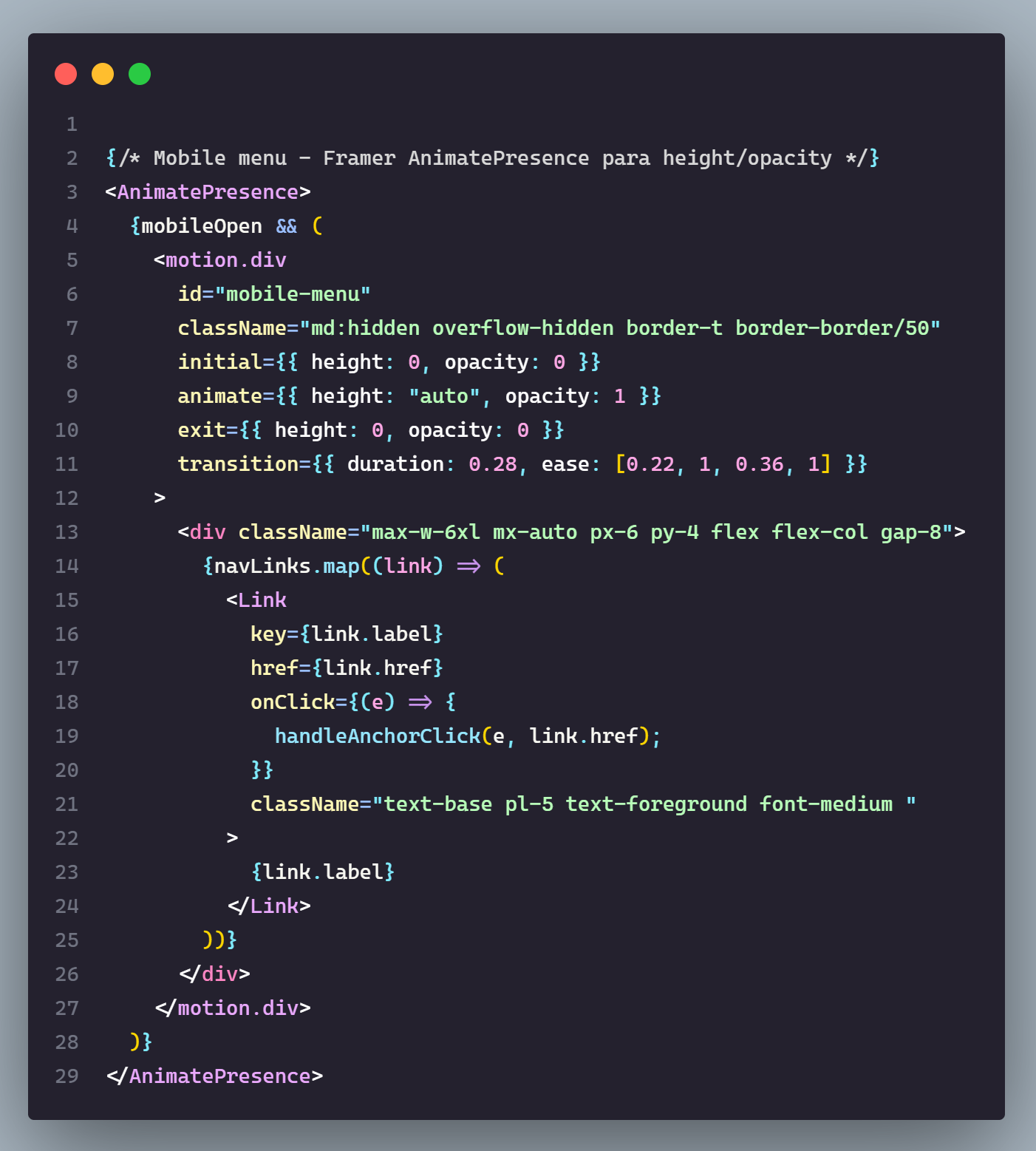
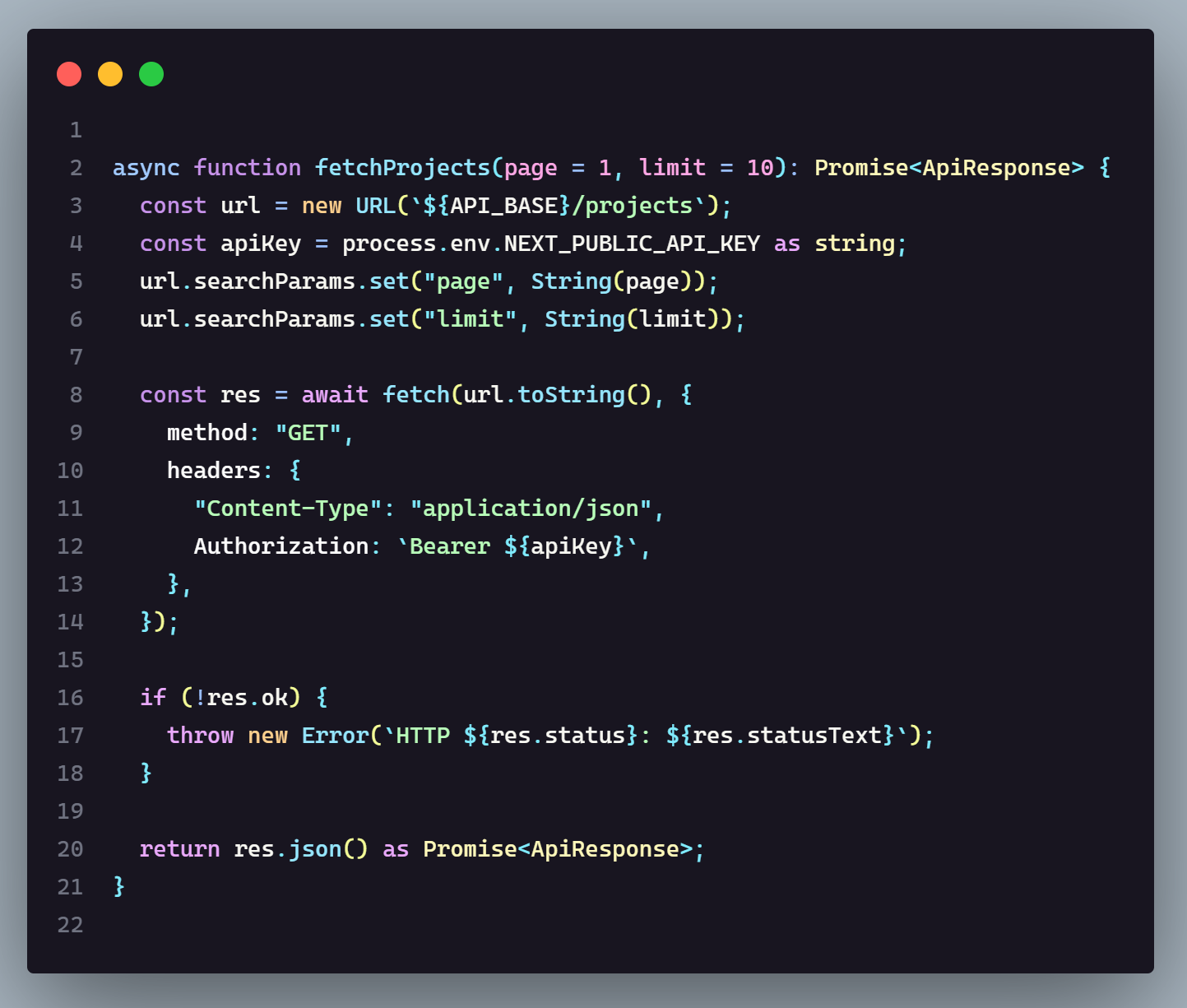
📸 Screenshots
Funky Dark
Funky Darker
🎨 Variants — Five ways to read the same code
Different developers read code differently. Some want pure color, some want deep night, some need accessibility, some love cursive. There is a Funky variant for each of them — same palette, five experiences.
| Variant | Description |
|---|---|
| Funky Dark | The main experience. Balanced contrast, vivid palette. |
| Funky Darker | Ultra-nocturnal backgrounds for zero-distraction sessions. |
| Funky Dark Italic | The full cursive treatment — control flow, storage types and metadata in italic, zero bold in code. For fans of italic-capable fonts like Operator Mono. |
| Funky Dark Mix | A directed typography strategy: bold on declaration names, italic on metadata, everything else regular. An anti-eye-fatigue balance. |
| Funky High Contrast | Accessibility-first borders and strong UI separation for maximum visibility. |
Five profiles, one palette — every variant keeps the meaning of every color while changing the reading experience. Two decisions drive the lineup: the italic layer is shared between Dark Mix and Dark Italic so they complement instead of colliding, and keyword italics — one of the more polarizing choices in syntax highlighting — live isolated in Funky Dark Italic instead of being forced on everyone. The choices are grounded in research across developer communities, theme discussions, and real-world usage patterns.
🌈 Color Philosophy
Funky Theme is built around a semantic, tiered color palette defined in a single source-of-truth config file. Every color has a name and a reason to exist:
- 🩷 Pinks — Tags, parameters, numeric constants
- 🟣 Purples — Keywords, support classes (flow keywords in a lighter purple)
- 🩵 Cyans — Functions, escape characters, regex group punctuation, structural top-of-file keywords (imports, use, require…)
- 🔵 Blues — Methods, symbol operators, storage modifier
- 🟡 Yellows — Type names, attribute names (e.g., HTML, CSS, JSX)
- 🟢 Greens — Strings, git untracked, inline code
- 🔴 Reds — Errors, deleted references
- 🟠 Oranges —
new/operator accents, auxiliary keywords (extends, mod…), deprecated tokens
One shared canvas. Dark themes often reach for deep blues — the familiar default — but blue-heavy darks can feel harsh or fatiguing to some eyes, even at low brightness. All five variants instead share one custom gray-mauve canvas, a friendlier take on deep night — grounded in research across developer communities, theme discussions, and real-world usage patterns. Only Darker goes deeper, and High Contrast keeps the same canvas while approaching accessibility through stronger borders and UI separation, not a darker background.
| Canvas | Variants |
|---|---|
#24212e gray-mauve |
Dark · Dark Italic · Dark Mix · High Contrast |
#181520 ultra-nocturnal |
Darker |
💻 Language Support
While primarily dedicated to and optimized for web development (specifically for workflows using React, HTML, CSS, JavaScript, TypeScript, Next.js, and Markdown), it has also been tested and tuned for the following:
Web frameworks & libraries
- React, Vue, Svelte, Angular
- Next.js
Languages
- TypeScript / TSX
- JavaScript (includes Node.js/Express)
- HTML, CSS / SCSS, XML
- C, C++, C#
- Go, Java
- PHP, Python, Rust
Formats & utilities
- Markdown, JSON / JSON5 & Regular Expressions (RegEx) — formats and utilities with dedicated rules
Popular dark themes — Dracula Theme, Material Theme, Tokyo Night - often recycle the same few colors across languages, blurring what is what. Funky Theme maps code by role instead: flow, structure, reference, creation. The same semantic part keeps its family color in every tested language.
⚙️ Recommended editor settings
Theme settings
Funky Theme is tested and tuned against the following editor settings. They are recommended, not required — the theme works with any font and spacing, but this is the setup it was designed and validated with:
{
  "editor.fontFamily": "Cascadia Code, monospace",
  "editor.fontLigatures": true,
  "editor.lineHeight": 23,
  "editor.tabSize": 2,
  "editor.fontSize": 14,
  "editor.bracketPairColorization.enabled": true
}
editor.lineHeightworks anywhere from 23 to 25 — pick what feels comfortable.Note: Cascadia Code isn't bundled with Funky Theme. If it isn't installed on your system, VS Code falls back to a system monospace font.
editor.bracketPairColorizationis the primary bracket rendering mode — the palette is configured for it. If disabled, VS Code falls back to a basic bracket colorization that doesn't leverage the theme's semantic colors.
Personal recommendations
Settings the maintainer enjoys — not required, but they make the editor feel better:
{
  "editor.cursorBlinking": "expand",
  "editor.cursorSmoothCaretAnimation": "on",
  "editor.mouseWheelZoom": true
}
Cursor animations add smoothness to caret movement — some find them fluid, others distracting.
editor.mouseWheelZoomscales only the editor text with Ctrl+scroll — unlikewindow.zoomLevel, which scales the entire UI (panels, sidebars, tabs). Handy if you prefer a compact UI but comfortable code size, though not everyone adjusts their zoom on the fly.
📦 Installation
| Platform | Status |
|---|---|
| VS Code Marketplace | Published |
| Open VSX (Cursor, Antigravity, VSCodium…) | Published |
| Zed Extensions | Published |
| AI Coding Agents | Beta — install from repo |
Funky Theme is available on both major VS Code-compatible registries — the VS Code Marketplace and Open VSX — plus the GitHub Releases .vsix for anything else. Pick the path that fits your editor.
Option A: VS Code Marketplace (Recommended)
Get it directly: VS Code Marketplace — or follow the steps below.
- Open the Extensions view (
Ctrl+Shift+Xon Windows/Linux orCmd+Shift+Xon Mac). - Search for "Funky Theme" — extension ID:
MaxGB23.funky-theme-vscode. - Click Install.
- Open the Command Palette (
Ctrl+Shift+Pon Windows/Linux orCmd+Shift+Pon Mac), runPreferences: Color Theme, and select your favorite Funky variant.
Option B: Open VSX (VS Code-compatible editors)
Get it directly: Open VSX — the open-source registry used by VS Code-compatible editors that cannot use the Microsoft Marketplace (Microsoft's ToS restricts forks): VSCodium (default gallery), Google Antigravity (default marketplace), Cursor (served through Cursor's own marketplace proxy), Windsurf / Devin Desktop, AWS Kiro, Gitpod (browser) and Eclipse Theia. In any of these, just open the editor's Extensions panel and search for "Funky Theme" — then pick a Funky variant via Preferences: Color Theme.
Option C: GitHub Releases (direct .vsix)
Prefer sideloading? Download the latest .vsix file from the Releases page and install it directly:
- Open the Command Palette (
Ctrl+Shift+Pon Windows/Linux orCmd+Shift+Pon Mac). - Type and select
Extensions: Install from VSIX.... - Browse and select the downloaded
.vsixfile. - Open the Command Palette again, run
Preferences: Color Theme, and select your favorite Funky variant.
Or install it via CLI:
code --install-extension path/to/funky-theme-vscode-x.x.x.vsixNote: Replace
codewith your editor's CLI command if you are not using VS Code, e.g.,cursor --install-extension ...,codium --install-extension ...(VSCodium), orantigravity --install-extension ...(Google Antigravity).
⚡ Zed support
Funky Theme ships a Zed extension built from the same palette source of truth, with three dark variants: Funky Dark, Funky Darker, and Funky Italic. High Contrast and Mix are not shipped in Zed.
Installation
Get it directly: Zed Extensions — open Zed, run zed: extensions, search for "Funky Theme", and install. Then pick a Funky variant via the theme picker.
Manual install (alternative). If you prefer to sideload or test unreleased changes:
Option A: copy the theme file. Copy zed/themes/funky-theme.json from this repo into your Zed themes folder:
- macOS/Linux:
~/.config/zed/themes/ - Windows:
%USERPROFILE%\AppData\Roaming\Zed\themes\
Then pick a Funky variant in Zed via the theme picker.
Option B: dev extension. In Zed, run zed: install dev extension from the command palette and select the zed/ directory of this repo (it contains extension.toml).
Color note (upstream, not a theme bug)
On macOS wide-gamut displays, Zed is not color-managed, so theme colors can look muted compared to VS Code — this affects every theme, not just Funky. Upstream issue: zed-industries/zed#9057.
Known limitations (Zed v0.2.0)
- Around 15 VS Code-only scopes have no Zed equivalent and are dropped:
acejump.*,sublimelinter.*,brackethighlighter.*,*.find-in-files, andinvalid.*(extension-specific scopes). - High Contrast and Mix variants are not shipped in Zed.
- The autocomplete match highlight renders bold — Zed's renderer hardcodes it and exposes no theme key.
editor.wrap_guide/editor.active_wrap_guideare column rulers; the visible indent guides areeditor.indent_guide*andpanel.indent_guide*.
🖥️ Terminals
The integrated editor terminal already ships with Funky Theme's ANSI palette — no extra setup required, and it works across shells such as Bash, Zsh, PowerShell, and others. The palette is most noticeable in shells and CLI tools that make extensive use of colored output.
Terminal-based AI Agents (BETA)
A standalone terminal palette for AI coding agents is being built in its own repo, funky-theme-tui — starting with gentle-shell, and with Pi along for the ride since gentle-shell runs on it, plus OpenCode and Claude Code. Two variants are planned, Funky Dark and Funky Darker, plus transparent background variants for people who run a custom terminal background. They are independent palettes — kept visually close to the editor theme, but tuned for the terminal experience, which is a different medium, so small variations per variant are expected. Minimal italics may be used where they aid readability, without a separate italic variant.
Status: WIP — currently around
v0.1.0; nothing published yet. It will ship to package marketplaces (like Pi packages) once v1 is stable.
🛠️ Build from source
Note: You can use
npmto install dependencies and run scripts, butpnpmis highly recommended for better security, stricter dependency resolution, and to avoid lockfile conflicts.
# Clone the repo
git clone https://github.com/maxgb23/funky-theme
cd funky-theme

# Install dependencies
pnpm install

# Compile the theme JSON files
pnpm build

# Generate the .vsix package
pnpm package
🤝 Maintenance & Contributing
Want to tweak colors, add new tokens, or build your own variant on top of Funky Theme?
👉 Read the Guía de Mantenimiento — a step-by-step guide covering the architecture, how to modify existing colors, and how to add new palette tokens.
The guide is written in Spanish, as most contributors and maintainers of this project are Spanish-speaking developers.
👻 Author
Maximiliano González Ballesteros — the developer behind Funky Theme.
- GitHub: maxgb23
- LinkedIn: in/maxballesteros
- X: @FunkyGtG
- Email: maxgonzalezballesteros@gmail.com
Special thanks to danelogotom-dotcom — not a code contributor, but part of the process: ideas, constructive criticism, and report feedback shaped the theme.
📄 License
MIT © Max González Ballesteros (@maxgb23)