Fjord Theme for Zed
A dusk-blue base with primary leaf-green accents, cyan selections, and crisp blue/cyan separation for the Zed editor.
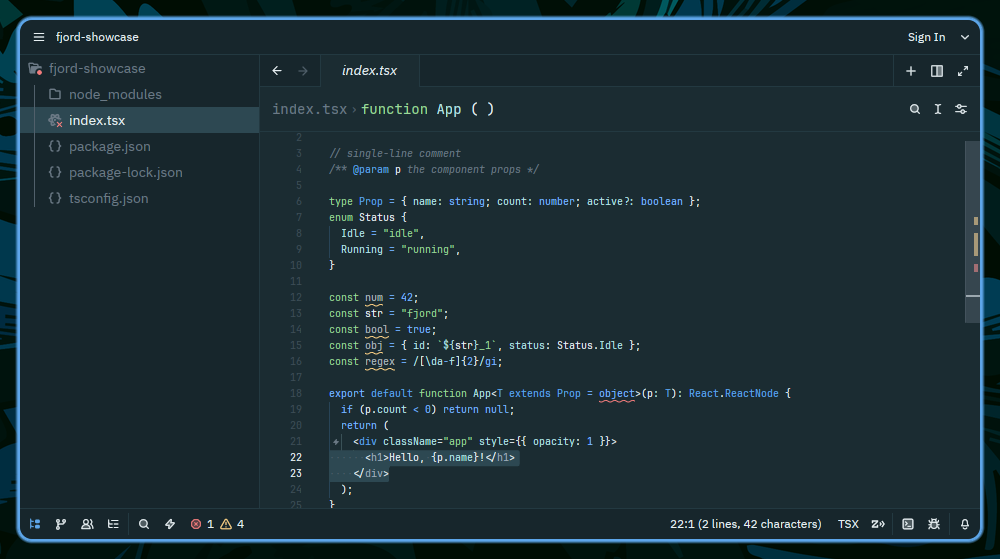
🎨 Color Palette
Core Colors
| Color | Name |
|---|---|
 |
background |
 |
backgroundAlt |
 |
surface |
 |
line |
 |
foreground |
 |
muted |
 |
mutedDim |
Accent Colors
| Color | Name |
|---|---|
 |
green (primary accent) |
 |
blue |
 |
yellow |
 |
purple |
 |
red |
 |
cyan |
📦 Installation
From Zed Marketplace
- Open Zed
- Open the Extensions panel (
Cmd+Shift+Xon macOS,Ctrl+Shift+Xon Linux/Windows) - Search for "Fjord"
- Click Install
Manual Installation
- Clone the theme to your config directory:
mkdir -p ~/.config/zed/themes/
git clone https://github.com/fjord-themes/fjord-zed.git --depth 1 ~/.config/zed/themes/fjord-zed- Copy the theme file to your Zed themes directory:
cp ~/.config/zed/themes/fjord-zed/themes/fjord.json ~/.config/zed/themes/fjord.json- Open the theme picker (
Ctrl+K Ctrl+Ton Linux/Windows,Cmd+K Cmd+Ton macOS) and select Fjord.
🔧 Configuration
The theme is designed to work transparently with your terminal colors while providing optimal contrast and readability in Zed.
🔄 Updates
This theme is automatically generated from fjord-core and deployed on every release. For an overview of all supported platforms and the full color palette, visit the Fjord GitHub page.
☕ Support My Work
If you enjoy the Fjord theme and find it useful, consider supporting my work:

📄 License
MIT License - see LICENSE file for details.
🤝 Contributing
For theme suggestions or issues, please open an issue on the Zed theme repository.