Emoji Completions for Zed
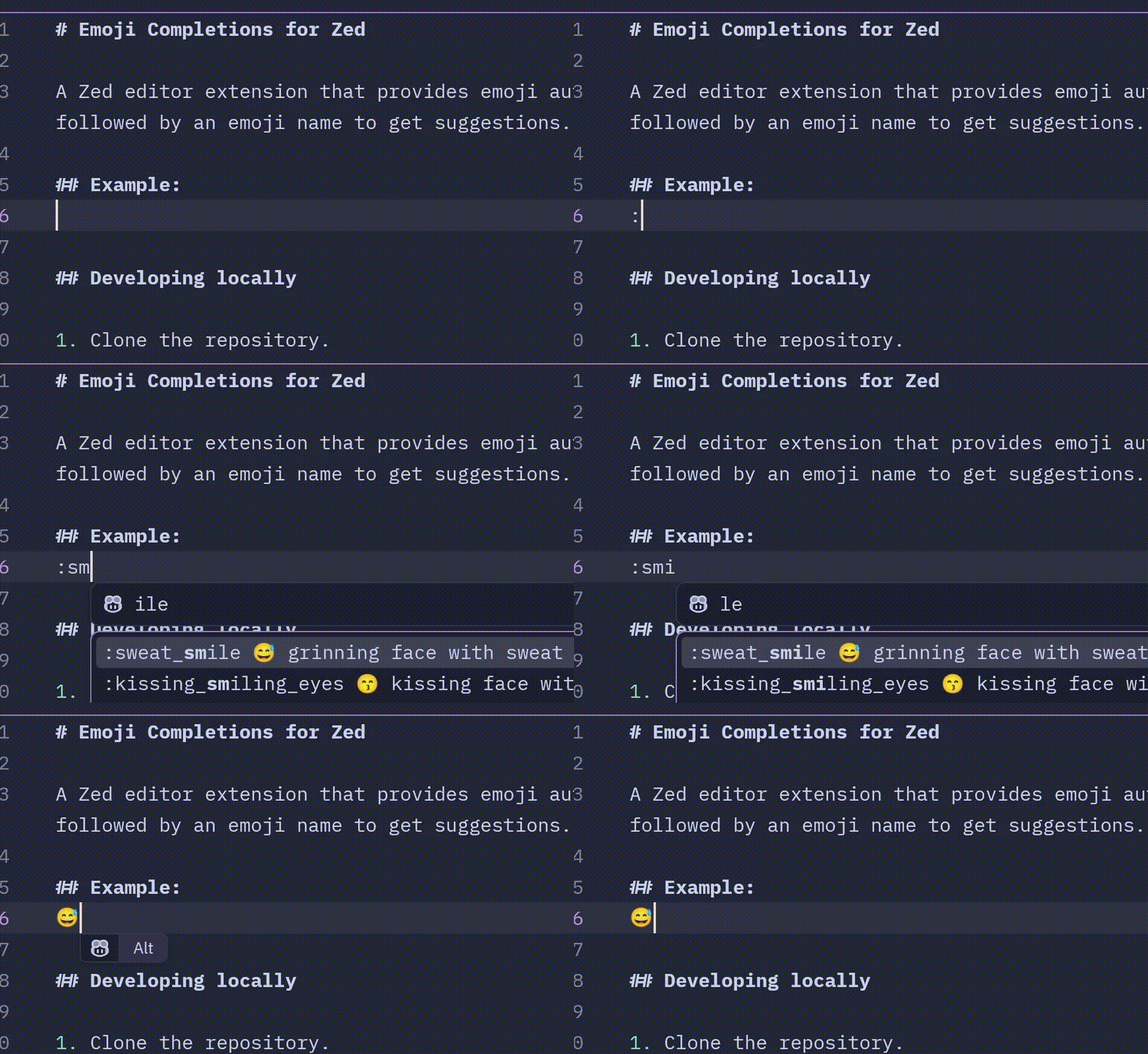
A Zed editor extension that provides emoji autocompletion similar to Slack. Type : followed by an emoji name to get suggestions.
A query can be up to two words, so :thumbs up finds 👍.
Example:
Styles
Three ways of writing emojis are supported, and any of them can be turned on at the same time:
| Style | Typed | Inserts |
|---|---|---|
slack (on by default) |
:smi |
😄 |
emojisense |
::smi |
:smile: |
teams |
(lau |
😄 |
Teams style matches the classic Teams codes, such as (y) and (laugh), as well as emoji names.
Choose the styles in your Zed settings.json:
"lsp": {
  "emoji-language-server": {
    "settings": { "styles": ["emojisense", "slack", "teams"] }
  }
}
An empty list turns completions off. Turning on emojisense makes :: at the start of a word trigger completions, as in C++'s ::std::vector, and turning on teams does the same for (, as in if (x.
Skin tone
Emojis that come in skin tones are inserted with the tone set in your Zed settings.json:
"lsp": {
  "emoji-language-server": {
    "settings": { "skin_tone": "medium-dark" }
  }
}
The values are default (yellow, used when the setting is missing), light, medium-light, medium, medium-dark and dark.
Turning it off for a language
Add this to your Zed settings.json, using the language name Zed shows in the status bar:
"languages": {
  "Rust": {
    "language_servers": ["!emoji-language-server", "..."]
  }
}
Zed only starts the server for languages listed in extension.toml, so it cannot be turned on for other languages this way.
Developing locally
- Clone the repository.
- Build using
cargo build --release -p emoji-language-server. - Point Zed at the built server in your Zed
settings.json:"lsp": { "emoji-language-server": { "binary": { "path": "/path/to/emoji-completions-zed/target/release/emoji-language-server" } } } - Use the
zed: install dev extensioncommand in Zed to install the extension from the repository directory. - After rebuilding, run
editor: restart language serverin Zed to pick up the new binary.
Making a release
This project uses immutable tags, which makes releasing a new version a bit more complicated than it would otherwise be.
- Bump the version in
Cargo.tomlandextension.toml, name the new version something like1.0.0-beta0. - Tag a pre-release in git:
git tag 1.0.0-beta0
git push origin 1.0.0-beta0- The release will now be built, but it will be marked as a draft. Mark the build as a pre-release in the GitHub UI.
- Build locally with
cargo build --release -p emoji-language-server. - Remove any downloaded
emoji-language-serverbinaries from the Zed extensions directory, and remove thelspsetting from "Developing locally" if you added it:# Linux rm -f ~/.local/share/zed/extensions/work/emoji-completions/emoji-language-server-* # macOS rm -f ~/Library/Application\ Support/Zed/extensions/work/emoji-completions/emoji-language-server-* - Use the
zed: install dev extensioncommand in Zed to install the extension from the local path. - Restart all language servers in Zed, this should trigger the new version to be used.
- Test that everything works as expected.
- Once verified, bump the version in
Cargo.tomlandextension.tomlto the stable version, e.g.,1.0.0, commit, and tag it. The release workflow fails if the tag does not match both files.git tag 1.0.0 git push origin 1.0.0 - Publish this release as the latest release
- Update the zed-extensions repo to point to the new version, in accordance with their instructions: https://zed.dev/docs/extensions/developing-extensions#updating-an-extension
Possible improvements (PRs welcome!)
- Non-language specific support (I don't think Zed supports this yet? Confirmed here: https://github.com/zed-industries/extensions/pull/3941#pullrequestreview-3500665902). Currently this only works in file types where the language server is explicitly activated.
Credits
Inspired by the Emojisense extension for Visual Studio Code: https://github.com/mattbierner/vscode-emojisense