Ember Tide
A warm–cool dark theme for VS Code, Zed and your terminal: a deep night canvas, ember coral and amber for the things you write, tide blue and teal for the things you call. Both editors are generated from a single palette, so they look the same.
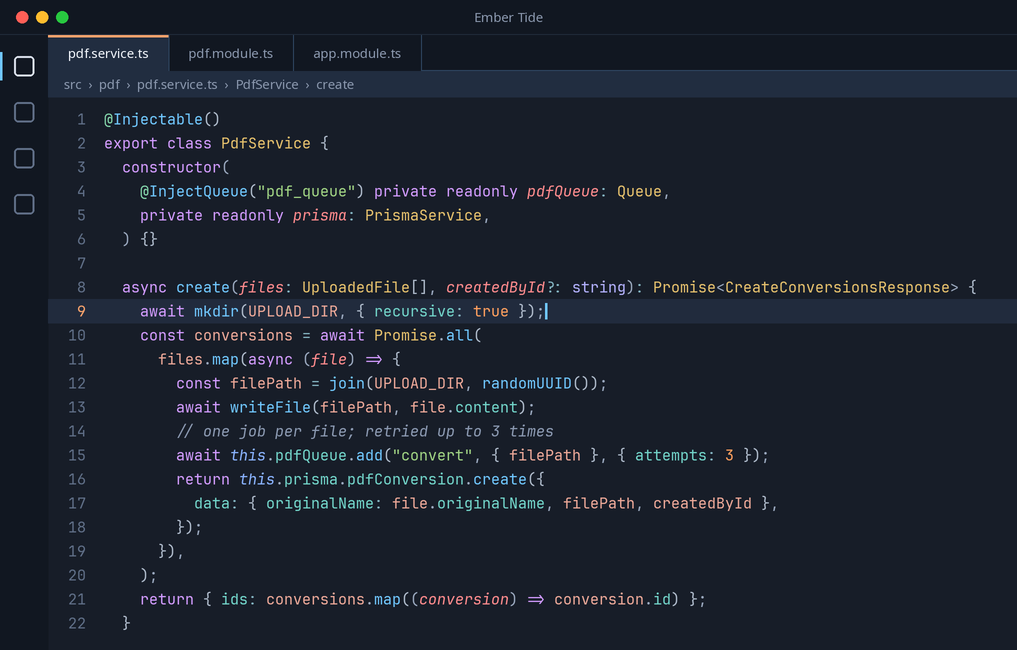
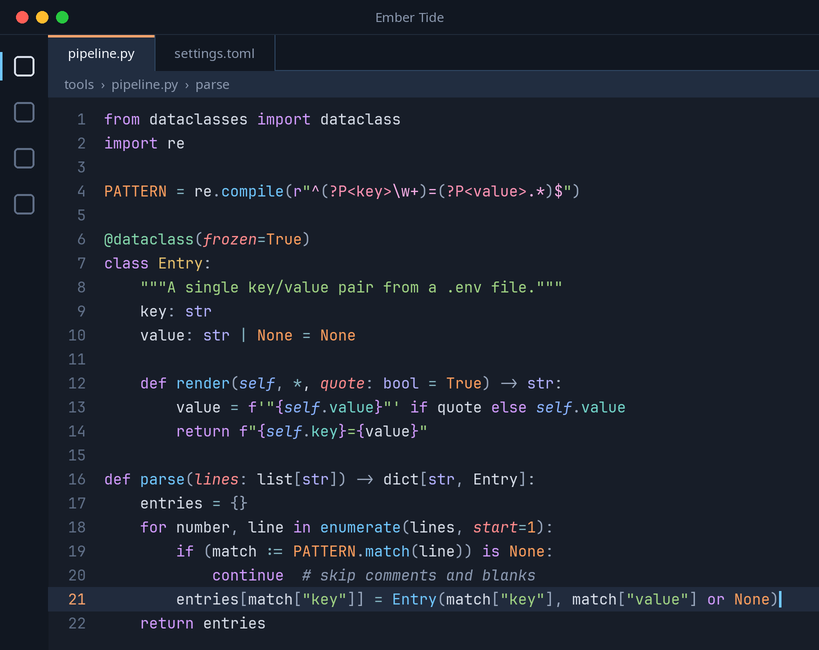
Highlights
- Readable first — every syntax color reaches at least 7:1 contrast on the editor background (≥ 7.2:1) and ≥ 5.9:1 on the highlighted line; comments stay ≥ 4.5:1 on both.
- Distinct roles — no two syntax roles are closer than ΔE2000 10, so keywords, types, parameters and values never blur together.
- Colorblind-checked — simulated for deuteranopia and protanopia (Machado 2009, full severity): the roles that sit
side by side (property, type, variable, namespace…) stay ≥ ΔE2000 6 apart (tritanopia ≥ 3). Known exception: with
red–green deficiency, function blue sits close to keyword violet and built-in-type lavender — kept to preserve the
vivid sky blue. Parameters and
this/selfalso differ by italics. - Consistent across 35+ languages — TypeScript/TSX, JavaScript, Python, Go, Rust, C/C++, C#, Java, PHP, Ruby, Lua, Swift, Dart,
R, Shell, PowerShell, SQL, HTML, CSS/SCSS, Markdown, JSON, YAML, TOML, INI,
.env, Dockerfile, Makefile, Prisma, Protobuf and more. - Semantic highlighting matched to the TextMate colors, so nothing jumps when the language server loads.
- Calm UI, clear states — an ember line marks the active tab; selection, search matches, symbol occurrences and hover each get their own hue.
- Tested —
npm testruns 160+ contrast, separation and color-blindness checks (palette plus the built theme, with translucent colors blended onto their real backgrounds), checks the generated files, and pins the published colors.
Palette
| Role | Color | |
|---|---|---|
| Keyword | #D29BFF |
violet |
| Function / method | #70C7FF |
sky blue |
| Property / field | #5ED7CB |
teal |
| Type / class | #F2CC78 |
gold |
Built-in type (string, int…) |
#B3B1FF |
lavender |
| Namespace / module | #BDAA67 |
olive gold |
| Number / constant / boolean | #FF9F5E |
orange |
| Decorator / attribute | #8EE0B5 |
mint |
| String | #ACE08F |
green |
| Variable | #FFAA92 |
coral |
| Parameter (italic) | #FF8689 |
coral red |
this / self (italic) |
#8AB3FF |
periwinkle |
| Comment (italic) | #8B94A2 |
slate |
Install
VS Code (and VSCodium, Cursor, Windsurf…)
Search “Ember Tide” in the Extensions view, then pick it with Ctrl/Cmd+K Ctrl/Cmd+T.
Zed
Open the command palette → zed: extensions → search “Ember Tide” → Install, then select it with theme selector: toggle.
Optional: semantic token rules for Zed
Zed already maps language-server tokens to theme styles. Three extra rules match VS Code more closely: TypeScript
parameter properties (constructor(private readonly db: Db)) use the property color, matching this.db; Rust built-in
types (i32, str) use the built-in type color; and Rust format specifiers ({}, {:?}) use the escape color. They
reference theme styles rather than hex colors — add them to your settings.json
(also in extras/zed-semantic-token-rules.json):
{
  "semantic_tokens": "combined",
  "global_lsp_settings": {
    "semantic_token_rules": [
      { "token_type": "parameter", "token_modifiers": ["readonly"], "style": ["property"] },
      { "token_type": "builtinType", "style": ["type.builtin"] },
      { "token_type": "formatSpecifier", "style": ["string.escape"] }
    ]
  }
}
Upgrading from 1.0.0? The old rules hard-coded hex colors. Replace them with the rules above — Zed's built-in rules already take decorator, namespace, parameter… colors from the theme.
Terminal
Matching palettes for Ptyxis, GNOME Terminal, Konsole, Windows Terminal, iTerm2, Ghostty, Kitty, Alacritty and WezTerm
live in terminals/ — see terminals/README.md for per-terminal install steps.
Recommended settings
The screenshots use JetBrains Mono at 15px with a 1.55 line height:
// VS Code
"editor.fontFamily": "'JetBrains Mono', monospace",
"editor.fontSize": 15,
"editor.lineHeight": 1.55,
"editor.fontLigatures": true,
"editor.semanticHighlighting.enabled": true
Build from source
Requires Node.js 18+. Works on Linux, macOS and Windows.
npm run build           # generate themes/ (VS Code), zed/ (Zed) and terminals/ from palettes/*.mjs
npm test                # contrast/separation rules on every built variant, output checks
npm run install:vscode  # package the .vsix and install it into VS Code / VSCodium / Cursor / Windsurf
npm run build:zed       # copy the theme into Zed's themes folder
npm run install:all     # VS Code + Zed + Ptyxis palette (Linux)
Colors live in palettes/dark.mjs; the editor-specific mappings are in src/.
node scripts/palette-report.mjs dark --all prints every quality check.