Efa Dark Theme for Zed
A dark theme extension for Zed, inspired by JetBrains IDEs and tuned for long coding sessions with balanced contrast.
Theme Preview
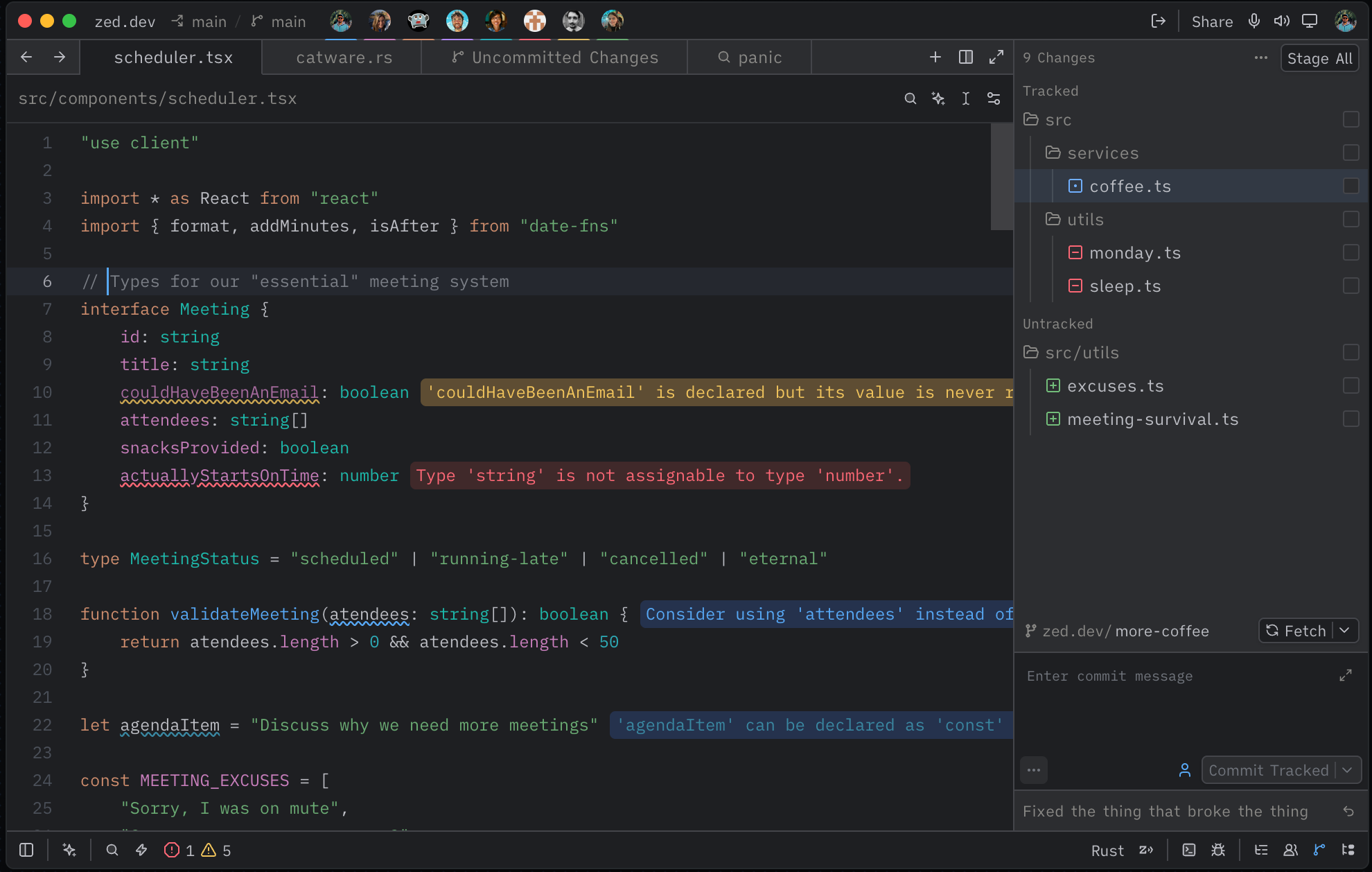
Efa Dark features:
- Deep dark background (
#1E1F22) for comfortable viewing - Vibrant but controlled syntax highlighting
- Distinct colors for keywords, strings, functions, and types
- Italic styling for comments, booleans, and constants
- Matching terminal ANSI palette
Repository Layout
This repository is packaged as a Zed extension:
.
├── extension.toml
├── screenshots/
│   └── efa-dark-theme-preview.png
├── themes/
│   └── efa-dark.json
├── LICENSE
└── README.md
Installation
Install directly from Zed's extension registry:
- Open the command palette (
cmd-shift-pon macOS,ctrl-shift-pelsewhere) and runzed: extensions. - Search for efa dark.
- Click Install on Efa Dark Theme.
- Open the theme selector with
cmd-k cmd-t(ctrl-k ctrl-ton Linux/Windows) and select Efa Dark.
To set it permanently, add to your Zed settings.json:
{
  "theme": "Efa Dark"
}
Local Development & Testing
- Open Zed and run
zed: extensionsfrom the command palette. - Click Install Dev Extension.
- Select this repository folder.
- Open the theme selector with
ctrl-k ctrl-t(cmd-k cmd-ton macOS). - Select Efa Dark and verify UI/syntax colors.
If the theme does not appear, run zed: open log and check extension loading output.
Publishing to Zed Extensions
To publish this theme in the official Zed extension registry:
- Push this repository to GitHub.
- Fork
zed-industries/extensions. - In your fork, add this repo as a submodule:
git submodule add https://github.com/valyefimov/zed-theme-efa-dark.git extensions/efa-dark-theme
git add extensions/efa-dark-theme- Add an entry to the top-level
extensions.tomlin the fork:
[efa-dark-theme]
submodule = "extensions/efa-dark-theme"
version = "1.0.0"- Run:
pnpm sort-extensions- Commit, push, and open a pull request to
zed-industries/extensions.
Once the PR is merged, the extension becomes available in Zed’s extension store.
Configuration
Set the theme directly in Zed settings:
{
  "theme": "Efa Dark"
}
Or keep dynamic light/dark mode:
{
  "theme": {
    "mode": "system",
    "light": "One Light",
    "dark": "Efa Dark"
  }
}
Color Palette
- Background:
#1E1F22 - Foreground:
#BCBEC4 - Blue (functions):
#56A8F5 - Orange (keywords):
#CF8E6D - Green (strings):
#6AAB73 - Cyan (numbers):
#2AACB8 - Magenta (properties):
#C77DBB - Teal (types):
#16BAAC
Author
Yefimov Valentyn
License
MIT — see LICENSE.